$23.99
Add to Cart
Paint Drawing Programs for Kids Children's Art Craft Develop Artist Window Mac
6 available
Details
Shipping: US-Mainland: free (more destinations)
Condition: Brand new
*The store has not been updated recently. You may want to contact the merchant to confirm the availability of the product.


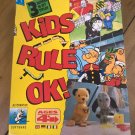
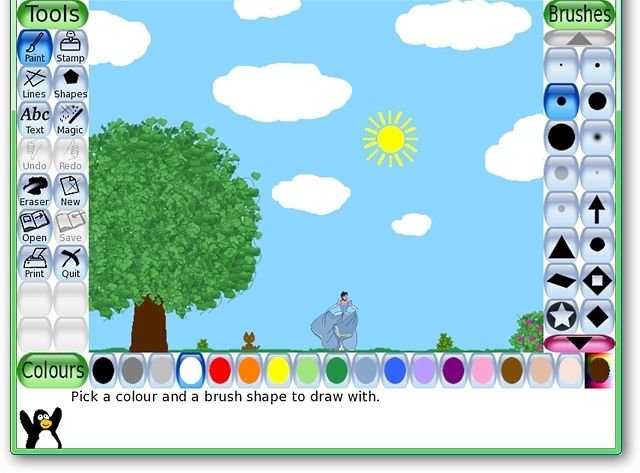
Drawing Software for children ages 3-12 Compatible with ALL Windows & Mac OSX 10.3.9 and higherOne disc for both PC and Mac An award-winning drawing program for children ages 3 to 12. It combines an easy-to-use interface, fun sound effects, and an encouraging cartoon mascot who guides children as they use the program. Kids are presented with a blank canvas and a variety of drawing tools to help them be creative. Along with paintbrush, shapes and text, this includes a "stamp" feature to add pre-drawn or photographic imagery to pictures, and a set of "magic tools" that provide filter effects (like blur, tint and waves) and interesting drawing tools (like train tracks, bubbles and grass). It includes a collection of "starter" images, both coloring-book style and photo-realistic, and a large collections of stamps are available as a separate download. Additional content can be added by parents and teachers, or downloaded from 3rd parties. Simple InterfaceA number of useful drawing tools are made available. The drawing canvas is a fixed size, so the user doesn't need to worry about 'pixels' or 'inches' when making a new picture.The entire program fits on a screen as small as 640x480, and can be displayed full-screen, to hide the computer's underlying 'desktop' interface. (It defaults to 800x600 mode, but can run at larger sizes and in portrait or landscape mode, as well.)Loading and saving of images is done using thumbnails, so no knowledge of the underlying operating system's filesystem structure is needed. Even filenames are unnecessary.Entertaining InterfaceFun sound effects are played when tools are selected and used.A cartoon version of Tux, the Linux penguin, appears at the bottom to give tips, hints and information.Drawing ToolsPaint brushVarious brushes availableParents/teachers can add more brushesBrushes can be animatedBrushes can change shape depending on the direction they're drawnAlternate color palettes can be created and usedRubber stampHundreds of photographic and cartoon stamps images are availableParents/teachers can add more stamps and create categoriesStamps can have descriptive text and sound samples (names, facts, etc.) and/or sound effects assigned to themStamps can be resized, flipped and mirroredRaster bitmaps (Portable Network Graphics ("PNG")) with full-color and alpha transparency (32bpp RGBA) supportedVector graphics (Scalable Vector Graphics ("SVG")) supportedLine toolUses Paint Brush's brushes'Rubberband' shows where the line will be drawn as you move the mouseShape toolDraw various filled and unfilled polygonal shapesRotate shapes (this feature can be disabled for younger children)Text and Label toolsCome with various fontsBold, italic and size can be changedParents/teachers can add more fontsSupports numerous languages (See International Character Input, below)Labels may be moved or edited later (New in 0.9.22)'Magic' (special effects) toolBlind - pull window blinds down, or across, the picture (New in 0.9.22)Blocks - turn parts of the picture 'blocky'Blur - blur parts of the picture using the mouseBricks - paint realistic large or small brick patternsCalligraphy - a smooth brush that changes thickness depending on how quickly you strokeCartoon - make parts of the picture look like a cartoonChalk - make parts of the picture look like a chalk drawingColor & White - turn the picture monotoneColor Shift - Jumble the colors of the pictureConfetti - Throw confetti over your pictureDarken - darken the colors of parts of the pictureDistortion - slightly alters the position of the picture under the brushDrip - make parts of the picture look like it's dripping awayEdges - outline the edges of shapes in yur pictureEmboss - gives the image's edges highlights and shadowsFill - 'flood-fill' an area with a particular colorFisheye - view parts of your picture through a fish-eye lenseFlip - flip the image verticallyFlower - draws curvy-stalked flowersFoam - paints foamy bubbles that grow as you move the mouseFold - fold down the corners of your pictureGlass Tile - see your drawing through glass tilesGrass - paint realistic clumps of grass on the screen and into the distanceHexagon Mosaic - create a pattern of hexagons (New in 0.9.22)Irregular Mosaic - turn your picture into a mosaic of shards (New in 0.9.22)Kaleidoscope - four symmetric brushesLight - draw beams of bright light on your pictureLighten - fade the colors of parts of the pictureMetal Paint - paints shiny metallic colorsMirror - flip the image horizontallyMosaic - make your picture into a mosaic of colorsNegative - invert the colors of parts of the pictureNoise - add random noise to your picturePerspective - bend your picture to view it from different perspectives (New in 0.9.22)Picasso - a triplet of brushes that paint in unisonPuzzle - shift parts of your picture around like it's a sliding puzzle (New in 0.9.22)ROYGBIV Rainbow - draw a rainbow arc of seven solid colors (New in 0.9.22)Rails - draw connecting train tracksRain - add raindrops to your pictureRainbow - draw using a brush that paints in all colors in the rainbowReal Rainbow - draw a colorful arc based on a real photo of a rainbowRipples - rippled waves over your imageRosette - three brushes that draw in a rosette patternShift - move the entire picture aroundSilhouette - turn parts of your picture into a silhouetteSmudge - push the colors around as though smudging wet paintSnow Ball - cover your picture in snowballsSnow Flake - cover your picture in snowflakesSquare Mosaic - create a pattern of squares (New in 0.9.22)String V - draw V-shaped string artString corner - draw string artString edges - draw string art around the edges of your pictureTV - make your picture look like it's on a televisionTint - change the color of parts of the pictureToothpaste - paint with colorful gelTornado - add a tornado funnel to your pictureWavelets - wiggle your picture up and downWaves - wiggle your picture side to sideWet Paint - draw with wet, smudgy paintZoom - zoom your entire picture in or out (New in 0.9.22)... plus, programmers can easily and quickly create new 'Magic' tools using a plug-in interface!EraserUndoMultiple levels of undoUndo actions can themselves be undone with the 'Redo' buttonCommandsSaveSave a picture to the virtual 'picturebook'One-click save: No file browser dialogs or filename prompts are usedIf saving an opened picture, choose to save over it (like 'Save' in desktop programs), or save a new picture (like 'Save As')OpenOpen a previous drawing by selecting its thumbnail in a virtual 'picturebook'Delete previously-saved picturesSlidesView a slideshow of multiple saved drawingsControl the speed of playback; create class presentations or simple looping animationsGo forward or back using the arrow keys or mouseStartersVarious coloring-book-style images includedPhotographic scenes included, with foreground and background elements that you draw in betweenVector graphics (Scalable Vector Graphics ("SVG")) supportedKid Pix templates ("KPX" files) supported (New in 0.9.22)PrintPrint pictures on a printerInternational Character Input Enter text in different languages using the Text tool:Latin languages - Spanish, French, Italian, Portuguese, etc.Japanese - Romanized Hiragana and Romanized KatakanaKorean - Hangul Bul-2ThaiTraditional ChineseParental and Teacher ControlsRun Tux Paint in full-screen mode, or have it 'grab' the mouse pointer, to prevent children from accidentally accessing other programs or files on the desktop.Sound effects can be disabled.The Print and Quit options can be disabled.Alternatively, the Print option can be limited to allow only one print every n minutes.Tux Paint cannot be launched more than once every 30 seconds, to prevent multiple copies from being run accidentally, due to over-eager mouse clicking.The directory/folder where Tux Paint saves files may be changed. This can be used to save pictures in a student's home directory on a network drive or shared drive, rather than locally on one particular workstation.Stamps, starters and brushes are stored using popular open formats (PNG, SVG, Ogg Vorbis, etc.) allowing parents and teachers to create their own content for use at home or in the classroom - even using completely free tools.The 'Tux Paint Config.' program allows parents, teachers, and school technicians to alter Tux Paint's behaviour using a simple, easy-to-use graphical interface. (It's separate from Tux Paint, to prevent children from changing things.)... and much more System Requirements Microsoft WindowsWindows 95, Windows 98, Windows Me, Windows NT 4, Windows 2000, Windows XP, Windows Vista, Windows 7, Windows 8, Windows 10 Mac OSX10.3.9 and higher F.A.Q Is this a trial version or full software?This is a full version of the software. We use open-source software to provide a more affordable alternative to expensive software on the market. We charge for our work to professionally make and package the CD for your usage. And if you have any questions, please feel free to contact us and we will try our best to assist you. Does the software violate any copyrights?No. I am authorized to distribute this software under the GNU LGPL. This listing does not violate the Digital Delivered Goods Policy as it ONLY offers a CD version. Can I install on more than one computer? Yes. You may install on unlimited PCs within your household and use this software without restrictions. Do you supply printed manual?No. All user manuals are in digital form. Is this Legal software? Yes! This is 100% legal software! All software under GNU LicenseWe are Authorized Distributors Under GNU GPL (General Public License) Does this software have to be activated? No activation is required ! Payment We accept all major credit cards and paypal ShippingNo shipment to Alaska/Hawaii, US Protectorates, APO/FPO, PO Box and International.You will receive a CD with a CD sleeve. Majority of our shipment are via FedEx with tracking number[!identifier_exists:
You may also be interested in:
-
$3.98

-
$11.95
-
$4.98

-
$3.98

-
$4.98

-
$3.98
-
$9.45
-
$26.75
-
$44.75
-
$6.97