
$1,059.00
Add to Cart
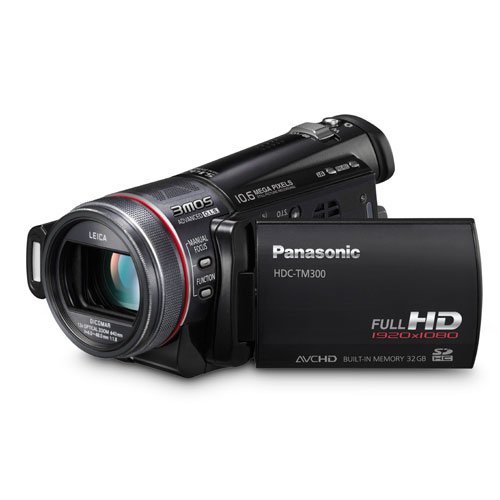
Panasonic HDC-TM300K Black


More than 10 available
Details
Shipping: USPS calculated - check
Condition: Brand new
*The store has not been updated recently. You may want to contact the merchant to confirm the availability of the product.
Overview
Full-HD images that bring out all the beauty of your memories.
High Definition vs. Standard Definition: What's the difference?
HD images contain 6 times as much information as standard images. HDTV has 1,080 horizontal scan lines, SDTV has 480. That translates into much higher resolution and much finer detail. With HD images on an HDTV, pictures are so clear and sharp that you can see textures. The shift in the industry from SDTV to HDTV is well underway. For shooting once-in-a-lifetime scenes that you want to capture in full beauty, an HD camcorder is the best choice.
3MOS System for Beautiful Images
For videos of important moments you want to preserve, you want high image quality. That's what Panasonic's 3MOS System delivers, with a combination of optical technologies that further enhance the quality of full-HD images. The 3MOS System produces extremely accurate images with superb rendition of differences in darkness and light, rich color expression, and a full 1,080 lines of horizontal resolution. This advanced technology helps turn once-in-a-lifetime moments into vivid, beautiful images.
iA (Intelligent Auto) for Smart Control
There's nothing more disappointing than shooting a once-in-a-lifetime event on video, only to discover that the images are blurry or poorly exposed because of backlighting. Panasonic's iA helps avoid problems in difficult shooting situations by automatically making the optimal camera settings and activating certain functions. For example, iA now includes AF Tracking, a new function that "locks" on and follows a subject as it moves, so images are sharply focused and properly exposed. This technology is a huge help for everyone.
Advanced O.I.S. (Optical Image Stabilization)
Panasonic's advanced O.I.S. helps suppress the effects of hand-shake as you shoot, for both motion and still images. This system uses gyrosensors to detect even tiny amounts of hand-shake, then shifts a lens and adjusts the optical axis to compensate - all at an astounding 4,000 times per second. It also covers approximately 3 times the stabilization area of our previous SD9 model. Because the system is optical, there's only minimal loss of image quality even when viewed on a large-screen TV. In addition, to shoot high-resolution still images, the normal O.I.S. Mode 1 is joined by an O.I.S. Mode 2, which has a higher stabilization capability. The O.I.S. corrective lens shifts and stabilizes the image the instant that the shutter button is pressed, to enable greater precision in stabilization. You get all the beauty and minimal blurring.
Get Creative - Advanced Functions for Serious Video Shooting
Craft images with intuitive ease: Manual Ring
The manual ring gives you easy, fingertip control over the focus, zoom and exposure settings. You'll find using the ring a much more intuitive, comfortable, user-friendly process than accessing a menu screen. With the manual ring and manual operation, the TM300 is a pleasure to use and gives you the freedom to craft unusually expressive images.
Zoom
Just rotate the ring to zoom in and out. You have full control of the zooming speed and can zoom in or out to the precise degree you want.
Focus
Just rotate the ring to focus. You can focus on the exact point you want, even if it's not in the center of the frame. You can also change the focus as you shoot, to get the kind of creative shots you sometimes see in movies.
White Balance
Select from Auto, Indoor, Outdoor, and White Set according to the location, weather, or type of lighting. You'll always get the best possible coloring even if the light source changes. *Only when using the EVF.
Shutter Speed
The shutter speed can be adjusted from 1/24 to 1/8,000 of a second. Use a high shutter speed when shooting sports events or fast-moving subjects, and you can get clear, sharp, incredible action shots. *Only when using the EVF.
Iris
Use the ring to adjust the aperture to regulate the amount of light let in. In dim lighting use a lower aperture setting (which corresponds to a larger aperture opening), and in bright lighting use a higher setting. *Only when using the EVF.
A precise way to check the lighting: On-Screen Assist
Zebra Pattern
A "zebra pattern" is displayed in areas of the frame where the lighting is excessive and the image is over-exposed.
Brightness Level
The light level is metered at the center of the frame and displayed as a percentage (%). This serves as a guide when you're shooting a subject that's backlit, or when you want to keep the light level the same even though the lighting conditions change.
Histogram
The histogram displays in graph form the exposure and contrast conditions over the entire frame. This lets you determine fine gradation details that are difficult to tell by just looking at the screen.
Time Lapse Recording
The time lapse function uses longer frame intervals than standard shooting. You can use this function to capture shortened or condensed footage of events that actually take place over a much longer time period. For example, time lapse recording is ideal for shooting a flower in the process of blooming, or a long, slow sunset. With time lapse recording, you have an interesting new video technique to explore. *The maximum continuous recording time is 12 hours.
Specifications
MEDIA .
Records Onto Built-in Memory (32GB), SD/SDHC Memory Card
Recording Format MPEG4-AVC/H.264 (AVCHD standard compliant); JPEG (Still Image)
LENS
Image Sensor (Total) 1/4.1" MOS x 3
Image Sensor (Effective) 6.21 megapixels (2.07 megapixels x 3) [16:9] [Motion Image]
7.95 megapixels (2.65 megapixels x 3) [3:2],
7.53 megapixels (2.51 megapixels x 3) [16:9],
6.96 megapixels (2.32 megapixels x 3) [4:3] [Still Image]
Total Pixels 9.15 megapixels (3.05 megapixels x 3)
F Value F1.8 (Wide) / F2.8 (Tele)
Optical Zoom 12x
Focal Length 4.0 - 48.0 mm
Filter Diameter 43mm
35mm Film Camera Equivalent 44.9-539mm [16:9] [Motion Image]
41.3-496mm [3:2], 40.8-490mm [16:9], 45.0-540mm [4:3] [Still Image]
Lens Type Leica Dicomar Lens 1
Image Stabilizer Advanced O.I.S. (Optical Image Stabilization)
Still Picture Recording Yes; 10.6 M (3984 x 2656), 7 M (3264 x 2176), 4.5 M (2592 x 1728) [3:2], 10 M (4224 x 2376), 6 M (3328 x 1872), 3.5 M (2560 x 1440) [16:9], 9 M (3520 x 2640), 8 M (3264 x 2448), 5 M (2560 x 1920), 0.3 M (640 x 480) [4:3]
Minimum Illumination 1.6 Lux (1/30 Low Light Mode), 1 Lux (Magic Pix)
Focus Auto/Manual
White Balance Auto/Indoor1/Indoor2/Sunny/Cloudy/White Set
High Speed Shutter 60i Auto Slow Shutter ON: 1/30-1/8000, OFF: 1/60-1/8000, 24P Auto Slow Shutter ON: 1/24-1/8000, OFF: 1/48-1/8000 [Motion Image]
1/2-1/2000, video flash: 1/2-1/500 [Still Image]
Iris Auto/Manual
Electronic Viewfinder (EVF) Yes
LCD Monitor 2.7" Wide LCD (230,400 pixels)
Manual Focus Ring Yes
MagicPix Images Yes
Simultaneous Motion Video & Still Picture Recording Yes; 8.3 M (3840 x 2160), 2.1 M (1920 x 1080) [16:9]
Creating Still Picture from Motion Picture 2.1 M (1920 x 1080) [16:9]
Speaker Dynamic type
Microphone 5.1ch Surround, Zoom and Focus Microphone
On-Screen Display Language English, French, Spanish
Digital Zoom 2 30x - 700x
LED Video Light No
Flash Yes
Video Recording Format MPEG4-AVC/H.264 (AVCHD standard complaint)
Recording Mode HA (17Mbps/VBR) (1920 x 1080), HG (13Mbps/VBR) (1920 x 1080), HX (9Mbps/VBR) 1920 x 1080), HE (6Mbps/VBR) (1440 x 1080)
Playback Mode HA (17Mbps/VBR) (1920 x 1080), HG (13Mbps/VBR) (1920 x 1080), HX (9Mbps/VBR) 1920 x 1080), HE (6Mbps/VBR) (1440 x 1080)
Audio Recording Format Dolby Digital [5.1ch]
Still Picture JPEG; 10.6 M (3984 x 2656), 7 M (3264 x 2176), 4.5 M (2592 x 1728) [3:2], 10 M (4224 x 2376), 6 M (3328 x 1872), 3.5 M (2560 x 1440) [16:9], 9 M (3520 x 2640), 8 M (3264 x 2448), 5 M (2560 x 1920), 0.3 M (640 x 480) [4:3]
SD CARD FEATURES .
Built-in SD Slot Yes
DPOF Max. 999 stills
PictBridge Compatible Yes
JACKS .
Video Component Yes
HDMI Yes (mini)
Audio Output Yes
USB 2.0 Hi-Speed
Microphone (stereo mini) Yes
Headphone (Stereo mini) Yes
Accessory Shoe Cold
AV Out
INCLUDED ACCESSORIES .
AC Adaptor Yes
Battery Pack min. 1250 mAh/Lithium-Ion
Video Component Cable Yes
AV Cable Yes
USB Cable Yes
Stylus Pen Yes
IR Remote Yes
SD Memory Card No
Software HD Writer AE 1.0
Other Cables AC/DC Cables
GENERAL .
Power Supply DC 7.2/9.3 V
Power Consumption 6.8W
Dimensions (H x W x D) 2.83'' x 2.75'' x 5.54''
Weight Approx. 0.85 lbs
Footnotes
1 Leica Dicomar products are manufactured by using Leica-Certified measuring instruments and quality assurance systems based on rigorous quality standards approved by Leica Camera AG. Leica is a registered trademark of Leica Microsystems IR GmbH and Dicomar is a registered trademark of Leica Camera AG.
2 As digital magnification increases, resolution significantly decreases.
Full-HD images that bring out all the beauty of your memories.
High Definition vs. Standard Definition: What's the difference?
HD images contain 6 times as much information as standard images. HDTV has 1,080 horizontal scan lines, SDTV has 480. That translates into much higher resolution and much finer detail. With HD images on an HDTV, pictures are so clear and sharp that you can see textures. The shift in the industry from SDTV to HDTV is well underway. For shooting once-in-a-lifetime scenes that you want to capture in full beauty, an HD camcorder is the best choice.
3MOS System for Beautiful Images
For videos of important moments you want to preserve, you want high image quality. That's what Panasonic's 3MOS System delivers, with a combination of optical technologies that further enhance the quality of full-HD images. The 3MOS System produces extremely accurate images with superb rendition of differences in darkness and light, rich color expression, and a full 1,080 lines of horizontal resolution. This advanced technology helps turn once-in-a-lifetime moments into vivid, beautiful images.
iA (Intelligent Auto) for Smart Control
There's nothing more disappointing than shooting a once-in-a-lifetime event on video, only to discover that the images are blurry or poorly exposed because of backlighting. Panasonic's iA helps avoid problems in difficult shooting situations by automatically making the optimal camera settings and activating certain functions. For example, iA now includes AF Tracking, a new function that "locks" on and follows a subject as it moves, so images are sharply focused and properly exposed. This technology is a huge help for everyone.
Advanced O.I.S. (Optical Image Stabilization)
Panasonic's advanced O.I.S. helps suppress the effects of hand-shake as you shoot, for both motion and still images. This system uses gyrosensors to detect even tiny amounts of hand-shake, then shifts a lens and adjusts the optical axis to compensate - all at an astounding 4,000 times per second. It also covers approximately 3 times the stabilization area of our previous SD9 model. Because the system is optical, there's only minimal loss of image quality even when viewed on a large-screen TV. In addition, to shoot high-resolution still images, the normal O.I.S. Mode 1 is joined by an O.I.S. Mode 2, which has a higher stabilization capability. The O.I.S. corrective lens shifts and stabilizes the image the instant that the shutter button is pressed, to enable greater precision in stabilization. You get all the beauty and minimal blurring.
Get Creative - Advanced Functions for Serious Video Shooting
Craft images with intuitive ease: Manual Ring
The manual ring gives you easy, fingertip control over the focus, zoom and exposure settings. You'll find using the ring a much more intuitive, comfortable, user-friendly process than accessing a menu screen. With the manual ring and manual operation, the TM300 is a pleasure to use and gives you the freedom to craft unusually expressive images.
Zoom
Just rotate the ring to zoom in and out. You have full control of the zooming speed and can zoom in or out to the precise degree you want.
Focus
Just rotate the ring to focus. You can focus on the exact point you want, even if it's not in the center of the frame. You can also change the focus as you shoot, to get the kind of creative shots you sometimes see in movies.
White Balance
Select from Auto, Indoor, Outdoor, and White Set according to the location, weather, or type of lighting. You'll always get the best possible coloring even if the light source changes. *Only when using the EVF.
Shutter Speed
The shutter speed can be adjusted from 1/24 to 1/8,000 of a second. Use a high shutter speed when shooting sports events or fast-moving subjects, and you can get clear, sharp, incredible action shots. *Only when using the EVF.
Iris
Use the ring to adjust the aperture to regulate the amount of light let in. In dim lighting use a lower aperture setting (which corresponds to a larger aperture opening), and in bright lighting use a higher setting. *Only when using the EVF.
A precise way to check the lighting: On-Screen Assist
Zebra Pattern
A "zebra pattern" is displayed in areas of the frame where the lighting is excessive and the image is over-exposed.
Brightness Level
The light level is metered at the center of the frame and displayed as a percentage (%). This serves as a guide when you're shooting a subject that's backlit, or when you want to keep the light level the same even though the lighting conditions change.
Histogram
The histogram displays in graph form the exposure and contrast conditions over the entire frame. This lets you determine fine gradation details that are difficult to tell by just looking at the screen.
Time Lapse Recording
The time lapse function uses longer frame intervals than standard shooting. You can use this function to capture shortened or condensed footage of events that actually take place over a much longer time period. For example, time lapse recording is ideal for shooting a flower in the process of blooming, or a long, slow sunset. With time lapse recording, you have an interesting new video technique to explore. *The maximum continuous recording time is 12 hours.
Specifications
MEDIA .
Records Onto Built-in Memory (32GB), SD/SDHC Memory Card
Recording Format MPEG4-AVC/H.264 (AVCHD standard compliant); JPEG (Still Image)
LENS
Image Sensor (Total) 1/4.1" MOS x 3
Image Sensor (Effective) 6.21 megapixels (2.07 megapixels x 3) [16:9] [Motion Image]
7.95 megapixels (2.65 megapixels x 3) [3:2],
7.53 megapixels (2.51 megapixels x 3) [16:9],
6.96 megapixels (2.32 megapixels x 3) [4:3] [Still Image]
Total Pixels 9.15 megapixels (3.05 megapixels x 3)
F Value F1.8 (Wide) / F2.8 (Tele)
Optical Zoom 12x
Focal Length 4.0 - 48.0 mm
Filter Diameter 43mm
35mm Film Camera Equivalent 44.9-539mm [16:9] [Motion Image]
41.3-496mm [3:2], 40.8-490mm [16:9], 45.0-540mm [4:3] [Still Image]
Lens Type Leica Dicomar Lens 1
Image Stabilizer Advanced O.I.S. (Optical Image Stabilization)
Still Picture Recording Yes; 10.6 M (3984 x 2656), 7 M (3264 x 2176), 4.5 M (2592 x 1728) [3:2], 10 M (4224 x 2376), 6 M (3328 x 1872), 3.5 M (2560 x 1440) [16:9], 9 M (3520 x 2640), 8 M (3264 x 2448), 5 M (2560 x 1920), 0.3 M (640 x 480) [4:3]
Minimum Illumination 1.6 Lux (1/30 Low Light Mode), 1 Lux (Magic Pix)
Focus Auto/Manual
White Balance Auto/Indoor1/Indoor2/Sunny/Cloudy/White Set
High Speed Shutter 60i Auto Slow Shutter ON: 1/30-1/8000, OFF: 1/60-1/8000, 24P Auto Slow Shutter ON: 1/24-1/8000, OFF: 1/48-1/8000 [Motion Image]
1/2-1/2000, video flash: 1/2-1/500 [Still Image]
Iris Auto/Manual
Electronic Viewfinder (EVF) Yes
LCD Monitor 2.7" Wide LCD (230,400 pixels)
Manual Focus Ring Yes
MagicPix Images Yes
Simultaneous Motion Video & Still Picture Recording Yes; 8.3 M (3840 x 2160), 2.1 M (1920 x 1080) [16:9]
Creating Still Picture from Motion Picture 2.1 M (1920 x 1080) [16:9]
Speaker Dynamic type
Microphone 5.1ch Surround, Zoom and Focus Microphone
On-Screen Display Language English, French, Spanish
Digital Zoom 2 30x - 700x
LED Video Light No
Flash Yes
Video Recording Format MPEG4-AVC/H.264 (AVCHD standard complaint)
Recording Mode HA (17Mbps/VBR) (1920 x 1080), HG (13Mbps/VBR) (1920 x 1080), HX (9Mbps/VBR) 1920 x 1080), HE (6Mbps/VBR) (1440 x 1080)
Playback Mode HA (17Mbps/VBR) (1920 x 1080), HG (13Mbps/VBR) (1920 x 1080), HX (9Mbps/VBR) 1920 x 1080), HE (6Mbps/VBR) (1440 x 1080)
Audio Recording Format Dolby Digital [5.1ch]
Still Picture JPEG; 10.6 M (3984 x 2656), 7 M (3264 x 2176), 4.5 M (2592 x 1728) [3:2], 10 M (4224 x 2376), 6 M (3328 x 1872), 3.5 M (2560 x 1440) [16:9], 9 M (3520 x 2640), 8 M (3264 x 2448), 5 M (2560 x 1920), 0.3 M (640 x 480) [4:3]
SD CARD FEATURES .
Built-in SD Slot Yes
DPOF Max. 999 stills
PictBridge Compatible Yes
JACKS .
Video Component Yes
HDMI Yes (mini)
Audio Output Yes
USB 2.0 Hi-Speed
Microphone (stereo mini) Yes
Headphone (Stereo mini) Yes
Accessory Shoe Cold
AV Out
INCLUDED ACCESSORIES .
AC Adaptor Yes
Battery Pack min. 1250 mAh/Lithium-Ion
Video Component Cable Yes
AV Cable Yes
USB Cable Yes
Stylus Pen Yes
IR Remote Yes
SD Memory Card No
Software HD Writer AE 1.0
Other Cables AC/DC Cables
GENERAL .
Power Supply DC 7.2/9.3 V
Power Consumption 6.8W
Dimensions (H x W x D) 2.83'' x 2.75'' x 5.54''
Weight Approx. 0.85 lbs
Footnotes
1 Leica Dicomar products are manufactured by using Leica-Certified measuring instruments and quality assurance systems based on rigorous quality standards approved by Leica Camera AG. Leica is a registered trademark of Leica Microsystems IR GmbH and Dicomar is a registered trademark of Leica Camera AG.
2 As digital magnification increases, resolution significantly decreases.


