
$9.88
Add to Cart
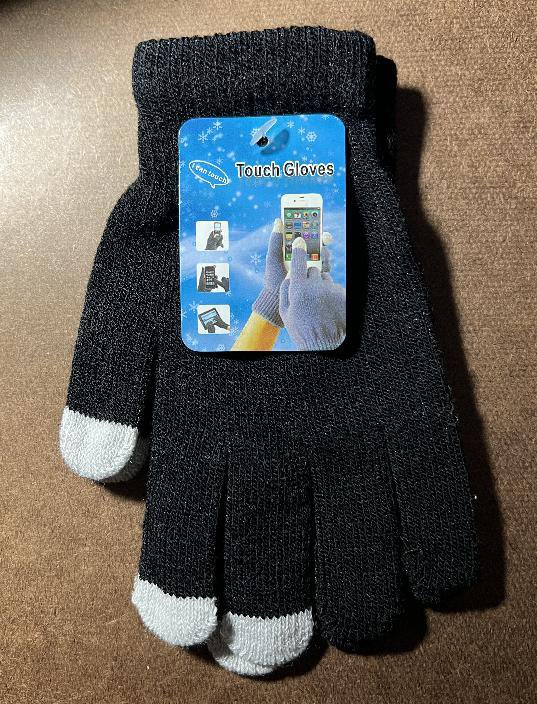
The Touch Gloves - Smartphone Touchscreen Gloves – Keep Your Gloves On And Use Your Touchscreen!


Only 1 available
Details
Shipping: US-Mainland: $2.87 (more destinations)
Condition: Brand new
Returns: does not accept (more)
The gloves ingenious design keeps your hands warm and allows you to use your touchscreen device at the same time!
Adjust Your Phone’s Settings
It is strongly recommend you increase the sensitivity of your phone’s touchscreen. Here’s how:
On an Android phone: Go to Settings, System, Languages, Keyboard, then Pointer speed, and then slide it to the max. These settings may vary based on your smartphone. Some Android phones also have an Increase touch sensitivity option or Screen protector mode you can find in the Display settings.
On an iPhone: Go to Settings, Accessibility, Touch, and tap Haptic Touch or 3D & Haptic Touch and adjust the slider to Fast. You may also consider tweaking some of the settings in Settings, Accessibility, Touch, Touch Accommodations.
95% acrylic
5% elasthane
Adjust Your Phone’s Settings
It is strongly recommend you increase the sensitivity of your phone’s touchscreen. Here’s how:
On an Android phone: Go to Settings, System, Languages, Keyboard, then Pointer speed, and then slide it to the max. These settings may vary based on your smartphone. Some Android phones also have an Increase touch sensitivity option or Screen protector mode you can find in the Display settings.
On an iPhone: Go to Settings, Accessibility, Touch, and tap Haptic Touch or 3D & Haptic Touch and adjust the slider to Fast. You may also consider tweaking some of the settings in Settings, Accessibility, Touch, Touch Accommodations.
95% acrylic
5% elasthane
You may also be interested in:
-
$46.49
-
$8.75

-
$14.99
-
$177.00

-
$177.29
-
$18.99

-
$38.44
-
$246.00
-
$18.99

-
$9.75


