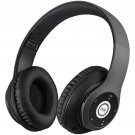
AYVVPII Lossless Player Bluetooth Headphones with Microphone Wireless Stereo Headset Music for Iphone Samsung Xiaomi mp3 Sports
1.Bluetooth V5.0+ MP3 function +FM Radio,Support stereo music, call ...
2. Supports all audio devices that have Bluetooth capability, such as cell phone, Tablet PC, laptop, computer etc
3. 3.5mm audio jack, provides simple wired connection of a variety of non-Bluetooth devices.
4. Allows you to answer or reject phone calls anytime, anywhere.
5. Charging via USB, rechargeable battery, convenient and practical.
6.Play time up to 20 hours, and keep talking time up to 15 hours, standby time up to 360 hours.
7. Good quality, foldable design and adjustable length hinges, very convenient to wear and easy to carry.
8. The best choice for listening to music, watching movie, chatting online etc.
9. With the SD card, without any Bluetooth device, you can still enjoy music at any time.
10. The cool shinning look adds the popular feeling.
Versión
V5.0
Frequency
2.40 GHz-2.48 GHz
Power
≤ 4 dBm, Clase 2
Effective Distance
10 M
Sensitivity
-84dbm/0.1% Ber
Frequency Response
20Hz-20 kHz
S/N rate
70 dB
Distortion
0.10%
Speaker size
40mm
Suport
A2DP 1.2, AVRCP 1.0, HSP, HSF 1.5
Voltage
3.7vdc (battery rechargable 400 mAh)
Play Time
UP TO 20 hour
Standby Time
360 hour
Charge Time
3.5 hour
Current
40 mA
Operate temperature
-4 ~ + 131 °F (-20 ~ + 55 °C)
. How to charge this headset?
Connect your computer and headphones with the USB cable.
. How to turn on headphones and listen to music on the computer?
Please make sure your computer has a bluetooth function and turn on the bluetooth, then press the headset ON/OFF key and you will see the blue light flashing and get ready to pair, search and pair until it connects. Use your computer to start the music and enjoy it with headphones.
. How to operate the bluetooth headset with mobile phone?
to. Turn on the bluetooth on the mobile phone, press the ON/OFF key of the headset, and you will see the blue light flashing, and it is ready to pair, search and pair until connected.
b. If someone calls you, you just need to press the hang up/pause button and you can chat with your friend on the phone. Finished talking, you just need to press the Hang Up/Pause button and you can continue your music.
. How to use the FM function?
Just press the MEQ button on the earphone, it will switch to FM mode, press the "PAUSE" button to scan the radio automatically, and short press "Volume +" and "Volume-" to choose the scanned radio.
.How to use the MP3 function?
Justin insert the TF card into the slot, the music will be played directly (we don't provide TF card)
Packing list:
1 x the colorful bluetooth headset
1 micro USB charging cable
1 instruction guide.
1.Bluetooth V5.0+ MP3 function +FM Radio,Support stereo music, call ...
2. Supports all audio devices that have Bluetooth capability, such as cell phone, Tablet PC, laptop, computer etc
3. 3.5mm audio jack, provides simple wired connection of a variety of non-Bluetooth devices.
4. Allows you to answer or reject phone calls anytime, anywhere.
5. Charging via USB, rechargeable battery, convenient and practical.
6.Play time up to 20 hours, and keep talking time up to 15 hours, standby time up to 360 hours.
7. Good quality, foldable design and adjustable length hinges, very convenient to wear and easy to carry.
8. The best choice for listening to music, watching movie, chatting online etc.
9. With the SD card, without any Bluetooth device, you can still enjoy music at any time.
10. The cool shinning look adds the popular feeling.
Versión
V5.0
Frequency
2.40 GHz-2.48 GHz
Power
≤ 4 dBm, Clase 2
Effective Distance
10 M
Sensitivity
-84dbm/0.1% Ber
Frequency Response
20Hz-20 kHz
S/N rate
70 dB
Distortion
0.10%
Speaker size
40mm
Suport
A2DP 1.2, AVRCP 1.0, HSP, HSF 1.5
Voltage
3.7vdc (battery rechargable 400 mAh)
Play Time
UP TO 20 hour
Standby Time
360 hour
Charge Time
3.5 hour
Current
40 mA
Operate temperature
-4 ~ + 131 °F (-20 ~ + 55 °C)
. How to charge this headset?
Connect your computer and headphones with the USB cable.
. How to turn on headphones and listen to music on the computer?
Please make sure your computer has a bluetooth function and turn on the bluetooth, then press the headset ON/OFF key and you will see the blue light flashing and get ready to pair, search and pair until it connects. Use your computer to start the music and enjoy it with headphones.
. How to operate the bluetooth headset with mobile phone?
to. Turn on the bluetooth on the mobile phone, press the ON/OFF key of the headset, and you will see the blue light flashing, and it is ready to pair, search and pair until connected.
b. If someone calls you, you just need to press the hang up/pause button and you can chat with your friend on the phone. Finished talking, you just need to press the Hang Up/Pause button and you can continue your music.
. How to use the FM function?
Just press the MEQ button on the earphone, it will switch to FM mode, press the "PAUSE" button to scan the radio automatically, and short press "Volume +" and "Volume-" to choose the scanned radio.
.How to use the MP3 function?
Justin insert the TF card into the slot, the music will be played directly (we don't provide TF card)
Packing list:
1 x the colorful bluetooth headset
1 micro USB charging cable
1 instruction guide.
You may also be interested in:
-
$19.54
-
$40.00

-
$99.99
-
$7.95
-
$18.99

-
$19.99

-
$99.99
-
$119.99
-
$124.99
-
$28.99