
• CATEGORIES
    • All Categories
    • Antiques
    • Art
    • Automotive
    • Baby
    • Beauty & Fragrances
    • Books & Magazines
    • Business & Industrial
    • Cameras & Photo
    • Cell Phones, PDAs & Accessories
    • Clothing & Shoes
    • Collectibles
    • Computers & Networking
    • Crafts
    • Electronics
    • Entertainment Memorabilia
    • Flowers & Gifts
    • Glass & Pottery
    • Health & Personal Care
    • Home & Garden
    • Jewelry & Watches
    • Misc
    • Movies & DVDs
    • Music
    • Office Supplies
    • Real Estate
    • Services
    • Sex Stuff
    • Sports & Outdoors
    • Sports Memorabilia
    • Tools & Hardware
    • Toys, Games & Hobbies
    • Video Games
  • COMMUNITY
  • FAQ
  • SELL
  • US
    • US
    • UK
    • AU
  • Cart
eCrater
  • Sign Up
  • Login
  • Home >
  • All Categories >
  • Electronics >
  • A/V Accessories & Cables(11270)
$200.00 Add to Cart

Sony DVBK-CW200 DV PC Still Image Capture Card Manual FLOPPY DISK PCMCIA II
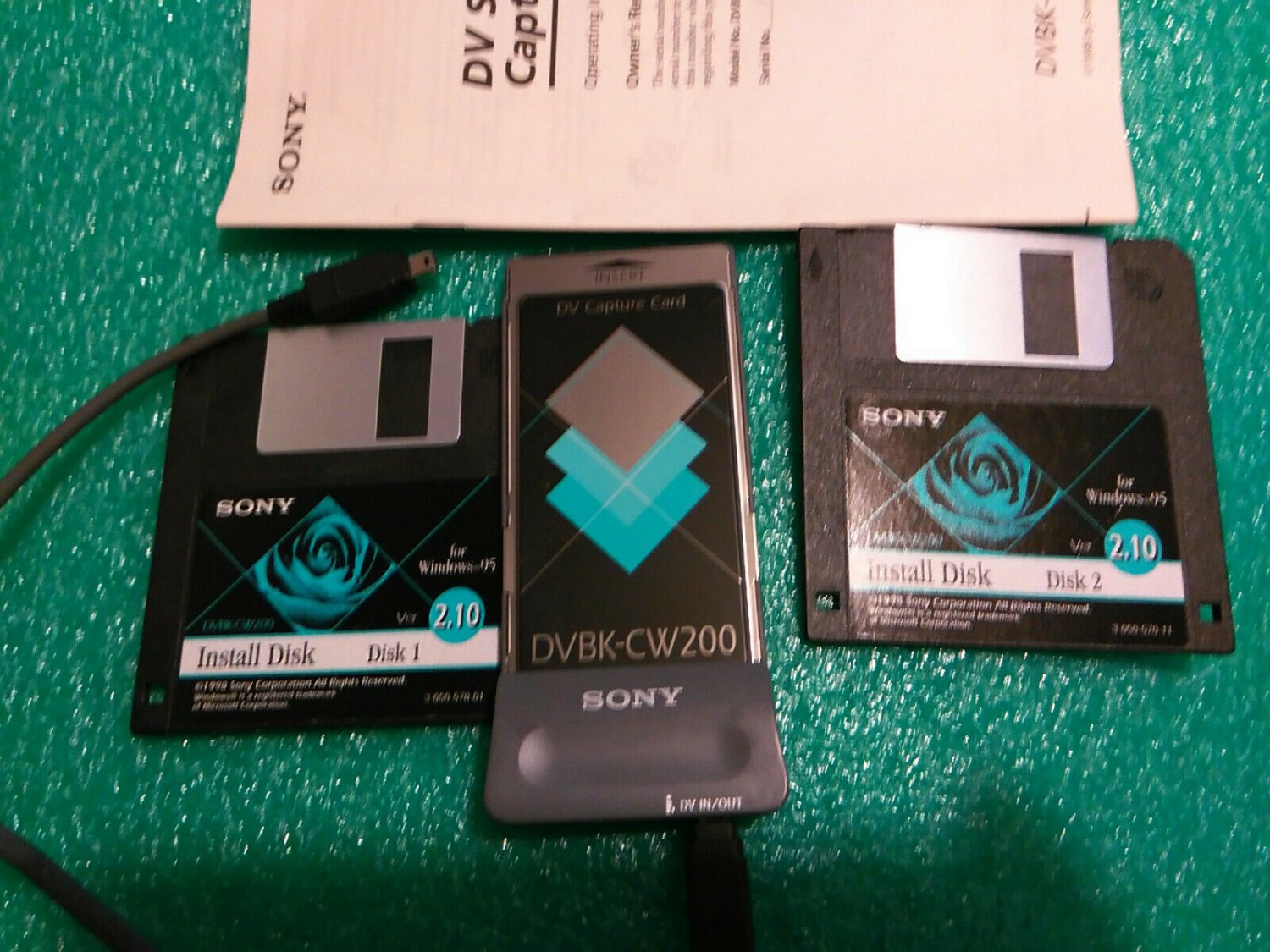
Sony DVBK-CW200  DV PC Still Image Capture Card  Manual   FLOPPY DISK  PCMCIA II

Only 1 available

Details

Shipping: US-Mainland: free (more destinations)

Condition: Used

  • Sony DVBK-CW200  DV PC Still Image Capture Card  Manual   FLOPPY DISK  PCMCIA II
  • Sony DVBK-CW200  DV PC Still Image Capture Card  Manual   FLOPPY DISK  PCMCIA II
  • Sony DVBK-CW200  DV PC Still Image Capture Card  Manual   FLOPPY DISK  PCMCIA II
  • Sony DVBK-CW200  DV PC Still Image Capture Card  Manual   FLOPPY DISK  PCMCIA II
  • Sony DVBK-CW200  DV PC Still Image Capture Card  Manual   FLOPPY DISK  PCMCIA II
  • Sony DVBK-CW200  DV PC Still Image Capture Card  Manual   FLOPPY DISK  PCMCIA II
  • Sony DVBK-CW200  DV PC Still Image Capture Card  Manual   FLOPPY DISK  PCMCIA II
Tweet    
  • Description
Sony DVBK-CW200 Dv Still Image Capture Card Manual AND FLOPPY DISK. FROM INTERNET: Product description Just connect the Digital camcorder (via DV In/Out terminal found on all Sony Digital camcorders), and you can capture still-image video directly without the need for analog conversion. This PCMCIA Type II Expansion Card is ideal for portable laptop use. It captures a single frame of Digital Video. The card features Plug and Play capability with Windows 95. You can Download/Upload from Digital Camcorder or laptop via DV Interface (IEEE 1394) there is a real time on screen preview of Digital Video feature. The card allows on-screen control of DV Camcorder and captures in two file formats:Bitmap and JPEG. Adobe Photo Deluxe Software included. Product Description: Device Type:Still-image capture adapter-plug-in card Interface Type:PC Memory Card Video Input:Still-image capture adapter-PC Card-plug-in card Digital Video Format:DV Audio Input Support:N/A OS Required:Microsoft Windows 95 Digital Video Capture Resolution:640x480 General: MPN:DVBK-CW200, DVB-KCW200 Device Type:Still-image capture adapter Enclosure Type:Plug-in card Interface Type:PC Memory Card Compatibility:PC Video: Type:Still-image capture adapter Form Factor:Plug-in card Interface Type:PC Memory Card Digital Video Format:DV Still Image Format:JPEG, BMP Still Image Capture Resolution:640x480 Audio Input Support:N/A Image Recording Format:JPEG, BMP Digital Video Capture Resolution:640 x 480 Expansion/Connectivity: Provided Interfaces:1x IEEE 1394 (FireWire) - 4 PIN FireWire-1-external Compatible Slots:1x PC Card-type II Interfaces:1x IEEE 1394 (FireWire)-4 PIN FireWire-1-external Miscellaneous: Software/System Requirements: Software Included:Drivers & Utilities, Adobe PhotoDeluxe OS Required:Microsoft Windows 95 Min Processor Type:Intel Pentium-100 MHz Min RAM Size:16 MB Min Hard Drive Space:10 MB
... [Full Description]

Title of Image

Seller Information

Seller

eldoradodo 4half/5 Stars
  • Contact Seller
  • 76.01%, 115 sales
‹ ›
View Store

Location

  • US, Indianapolis, IN

Payment

  • Credit Cards
  • Credit Cards accepted via:
  • PayPal
  • © 2026
  • ·
  • eCRATER
  • ·
  • Get your free online store
Last Updated: 8 Jun 2026 17:58:38 PDT
  • about
  • ·
  • terms
  • ·
  • privacy
  • ·
  • dmca
  • ·
  • contact
  • ·
  • news
Follow Us