$108.55
Add to Cart
Aigo Aurora C5 Kit Case Fan 5 Pack RGB LED 120mm High Performance High Airflow A
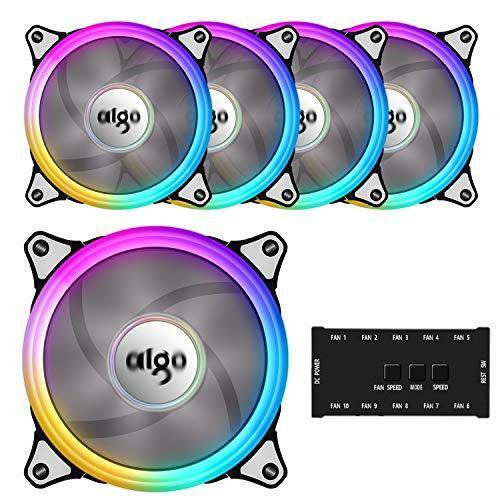


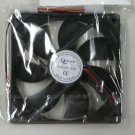
Aigo Aurora C5 Kit Case Fan 5 Pack RGB LED 120mm High Performance High Airflow A Limited Time Offer - Buy NOWLAST ITEM AVAILABLE Aigo C5 Kit provide awesome LED visual effect and various color & modes. It can adjust fan speed, color, and modes just by a controller. Please Note? When connected with aigo C5 fans, It must from FAN1 sequentially connected to ;b>Hook up your reset switch to the fan controller, press the button to change the color mode. Connect the fan to the controller with a 6 pin connector, connect the controller to the motherboard with a 4 pin ;/b>Package Includes:5pcs 120mmaigo LED Ring Halo Case Fan 20pcs Mounting Screws 1pcs Controller 1x USER Manual Features: LED Color: RGB Product Dimension: 120mm(W) x 120mm(D) x 25mm(H) Operating Voltage: 12V Power Input: Weight: 570g Rated Power: Rated Voltage: DC 12V(fan) / 5V(LED)Rated Current: Airflow: 38cfm Fan Speed: (+/-10%) RPM Sound Level; dBA Connector: 6 pin/4pin connector Bearing Type: Hydraulic BearingLifetime: HrsController Connector:10*6PIN(for fan),1*4PIN(for DC power supply)Guarantee: One year . If the item you received is defective in any way or you purchased the wrong item or any other questions, please us via Amazon message system. We will reply you in 24 hours and try our best to solve your problems. Colorful lightning design. It has a special designed to give your buildawesome LED visual effect by a 3-button controller.The hydraulic bearing self-lubricates with a high quality, friction-reducing substance which lowers operating noise and improves efficiency.Controller Connector: 10*6PIN & 1*4PIN, 6Pin interface to provides RGB FAN safe and reliable power output, make the lights appear bright and colorful.The most commonly size(120mm) for computer case & radiators. Fan blades are designed for optimal airflow while keeping noise to a minimum level.Please Note? When connected with aigo C5 fans, It must from FAN1 sequentially connected to FAN10. Connect the fan to the controller with a 6 pin connector, connect the controller to the motherboard with a 4 pin connector.
You may also be interested in:
-
$10.95
-
$19.99

-
$16.99
-
$10.99
-
$8.49
-
$6.49
-
$8.00
-
$9.99
-
$7.49
-
$8.00