$69.76
Add to Cart
Jailbroken Amazon Fire TV Stick 2nd Gen w/ Alexa Remote, Kodi 17.4 & Mobdro!
More than 10 available, 1 sold
Details
Shipping: US-Mainland: free (more destinations)
Condition: New other, see desc
*The store has not been updated recently. You may want to contact the merchant to confirm the availability of the product.


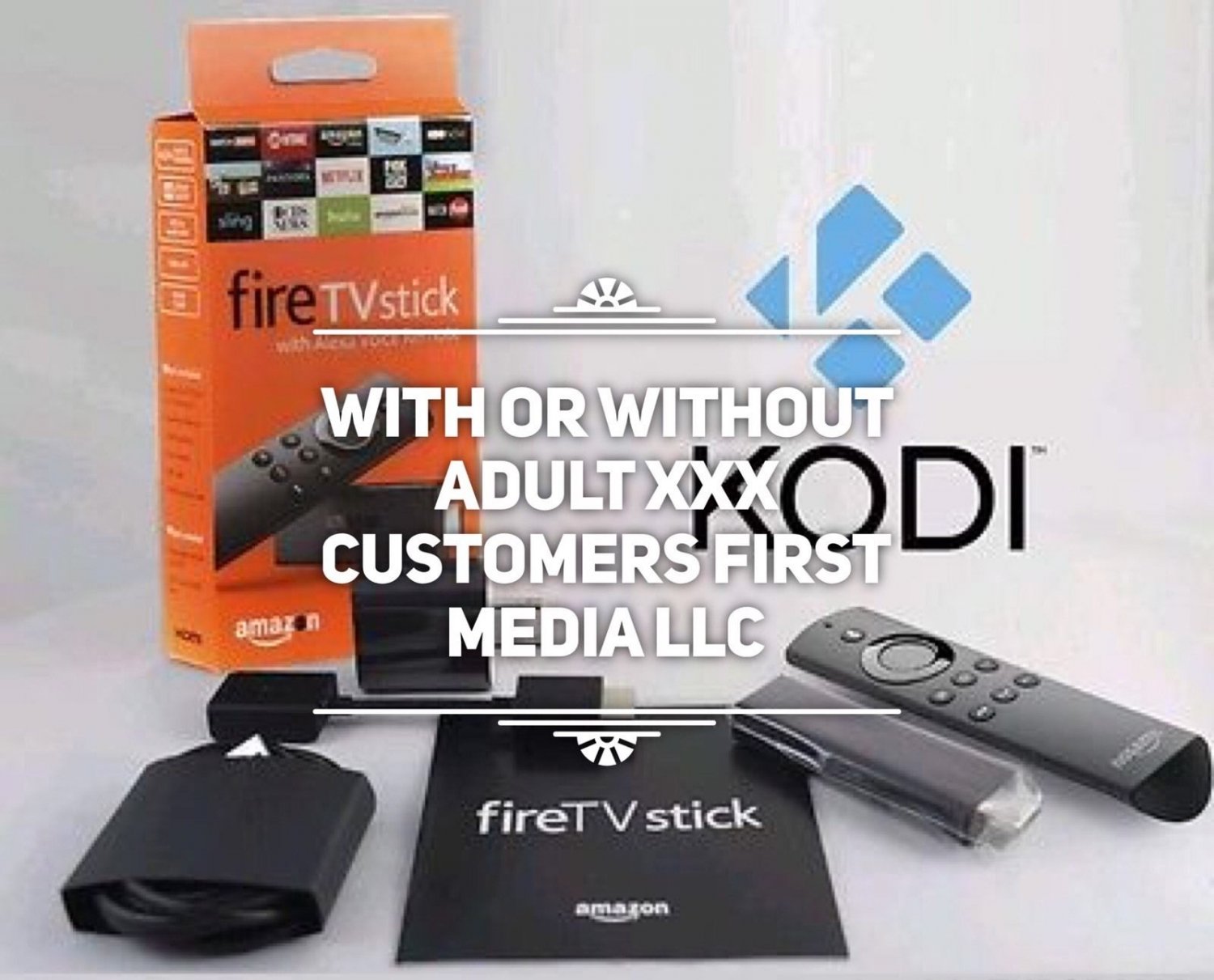
This is the latest Jail-broken Amazon Fire-stick with a fresh Install of of the Krypton Kodi 17.3 . Installed within Kodi is the newest No Limits Magic build which I believe to be the best build to watch all the latest movies and shows. You will be amazed at the clarity and ease the No Limits Magic build provides. If you're looking for an Amazon Fire stick with Kodi in it be sure to bid on this one, I have taken my time and efforts in order to provide you with the Best and Fastest Kodi Build, others selling don't always know what builds and settings will give the end user the best and fastest experience. I have installed a number of other apps on the Fire-stick to enhance your viewing experience, Read Full List of Apps Below. This is a fully modded Fire-stick, we have also added Bluetooth capabilities to it so you can now connect a Bluetooth 3.0 keyboard and mouse or earphones.
There is a reason more people bid on my Fire-sticks, and it's because I take the time to give a feature rich modded Fire-stick with a bunch of Apps that you will enjoy.
IMPORTANT- DO NOT at anytime factory restore, reset or "Clear Data" on your Amazon Fire-stick, or the Kodi and other installed applications will be permanently erased from the Fire-stick.
The Build within the Kodi App is a Family Friendly install, if you would like "XXX Rated" Addons installed in the menu please let us know as soon as the auction ends, and we will add it in.
What is included?
1 New Amazon Fire TV Stick in original packaging
1 Alexa Voice Remote w/ Batteries
1 Wall power adapter and power Cable
1 HDMI extender
1 Manual
"Lorreta" the puppet is not included in purchase
Apps on the Fire-stick:
Kodi v17.3 KRYPTON - Media Player with custom skins and all the latest Kodi Add-ons/Stream libraries (list of kodi's add-ons provided below)
Mobdro - One of the most requested apps out there
Terrarium TV - Users have confessed to loving this app more then Kodi (this app alone makes the purchase worth it)
Facebook - Amazons Facebook app is very limited, this is a full feature Facebook app on your Firestick
Firefox Browser - There are no browsers in Amazon's app store, now you have one
Appstarter - An alternate launch menu and settings shortcut for all you apps, but most important are the kodi updates it provides (no on e else has this)
Chrome Browser - Gives you a second browser to choose from. Pick your favorite
Mx Video Player - This app is a dependency for Terrarium Tv to to work properly
Vlc Video Plaer - A second video app you can select to use within the settings of the Terrarium Tv app
IpVanish - This is a subscription based service app incase you ever want to use a vpn
MouseToggle - This allows you to turn your remote into a mouse pointer with the double click of a button.
Adobe Flash - This will enable you to see flash video thru your browser.
Bluetooth - Now you can connect Bluetooth 3.0 devices such as a keyboard, mouse, or headphones
Addons within the Kodi App:
Bob
cCloud TV
Castaway
Echo documentaries
Evolve
Exodus
Phoenix
Sanctuary
GoodFellas
Pro Sport
Sports Devil
Stream All the Sources(SALTS)
Toon Mania
UK Turk Playlist
Velocity
… and many, many, many more
Problems with your Fire-stick?
Videos are slow, or buffer too much
Internet speeds of 25 Mbps or higher are recommended for smooth HD video streaming. Standard/Low definition streams require 10Mbps speeds. If you connect to the internet through a VPN, make sure your VPN connection meets the speed requirements specified above.
At times, stream sources provided by add-ons to the Kodi Streaming Media Player can be overloaded and/or unavailable. If your network connection meets the minimum speed requirements and your playback is still intermittent, try another stream source.
Kodi menus load slow
This is normal for the initial load of Kodi, or even the loading of a submenu within Kodi for the first time/first time in a long time. Graphics for the menus are downloaded from the internet and cached on the Fire TV/TV Stick device the first time a menu is accessed. Sequential loads of the same menu should see considerable performance improvement.
The Kodi App is Frozen
Go to Amazon Home Page. From the top menu, select:
Settings > Application > Manage Installed Applications
Find Kodi in the application list and select it. Select the Force stop option from the menu, after which you can press the Launch Application to start Kodi again. Unplugging/restarting the device also works.
There is a reason more people bid on my Fire-sticks, and it's because I take the time to give a feature rich modded Fire-stick with a bunch of Apps that you will enjoy.
IMPORTANT- DO NOT at anytime factory restore, reset or "Clear Data" on your Amazon Fire-stick, or the Kodi and other installed applications will be permanently erased from the Fire-stick.
The Build within the Kodi App is a Family Friendly install, if you would like "XXX Rated" Addons installed in the menu please let us know as soon as the auction ends, and we will add it in.
What is included?
1 New Amazon Fire TV Stick in original packaging
1 Alexa Voice Remote w/ Batteries
1 Wall power adapter and power Cable
1 HDMI extender
1 Manual
"Lorreta" the puppet is not included in purchase
Apps on the Fire-stick:
Kodi v17.3 KRYPTON - Media Player with custom skins and all the latest Kodi Add-ons/Stream libraries (list of kodi's add-ons provided below)
Mobdro - One of the most requested apps out there
Terrarium TV - Users have confessed to loving this app more then Kodi (this app alone makes the purchase worth it)
Facebook - Amazons Facebook app is very limited, this is a full feature Facebook app on your Firestick
Firefox Browser - There are no browsers in Amazon's app store, now you have one
Appstarter - An alternate launch menu and settings shortcut for all you apps, but most important are the kodi updates it provides (no on e else has this)
Chrome Browser - Gives you a second browser to choose from. Pick your favorite
Mx Video Player - This app is a dependency for Terrarium Tv to to work properly
Vlc Video Plaer - A second video app you can select to use within the settings of the Terrarium Tv app
IpVanish - This is a subscription based service app incase you ever want to use a vpn
MouseToggle - This allows you to turn your remote into a mouse pointer with the double click of a button.
Adobe Flash - This will enable you to see flash video thru your browser.
Bluetooth - Now you can connect Bluetooth 3.0 devices such as a keyboard, mouse, or headphones
Addons within the Kodi App:
Bob
cCloud TV
Castaway
Echo documentaries
Evolve
Exodus
Phoenix
Sanctuary
GoodFellas
Pro Sport
Sports Devil
Stream All the Sources(SALTS)
Toon Mania
UK Turk Playlist
Velocity
… and many, many, many more
Problems with your Fire-stick?
Videos are slow, or buffer too much
Internet speeds of 25 Mbps or higher are recommended for smooth HD video streaming. Standard/Low definition streams require 10Mbps speeds. If you connect to the internet through a VPN, make sure your VPN connection meets the speed requirements specified above.
At times, stream sources provided by add-ons to the Kodi Streaming Media Player can be overloaded and/or unavailable. If your network connection meets the minimum speed requirements and your playback is still intermittent, try another stream source.
Kodi menus load slow
This is normal for the initial load of Kodi, or even the loading of a submenu within Kodi for the first time/first time in a long time. Graphics for the menus are downloaded from the internet and cached on the Fire TV/TV Stick device the first time a menu is accessed. Sequential loads of the same menu should see considerable performance improvement.
The Kodi App is Frozen
Go to Amazon Home Page. From the top menu, select:
Settings > Application > Manage Installed Applications
Find Kodi in the application list and select it. Select the Force stop option from the menu, after which you can press the Launch Application to start Kodi again. Unplugging/restarting the device also works.
You may also be interested in:
-
$5.99
-
$7.99
-
$6.99
-
$6.99
-
$8.99
-
$5.99
-
$113.05
-
$10.00

-
$129.99
-
$99.00