$189.99
On Hold
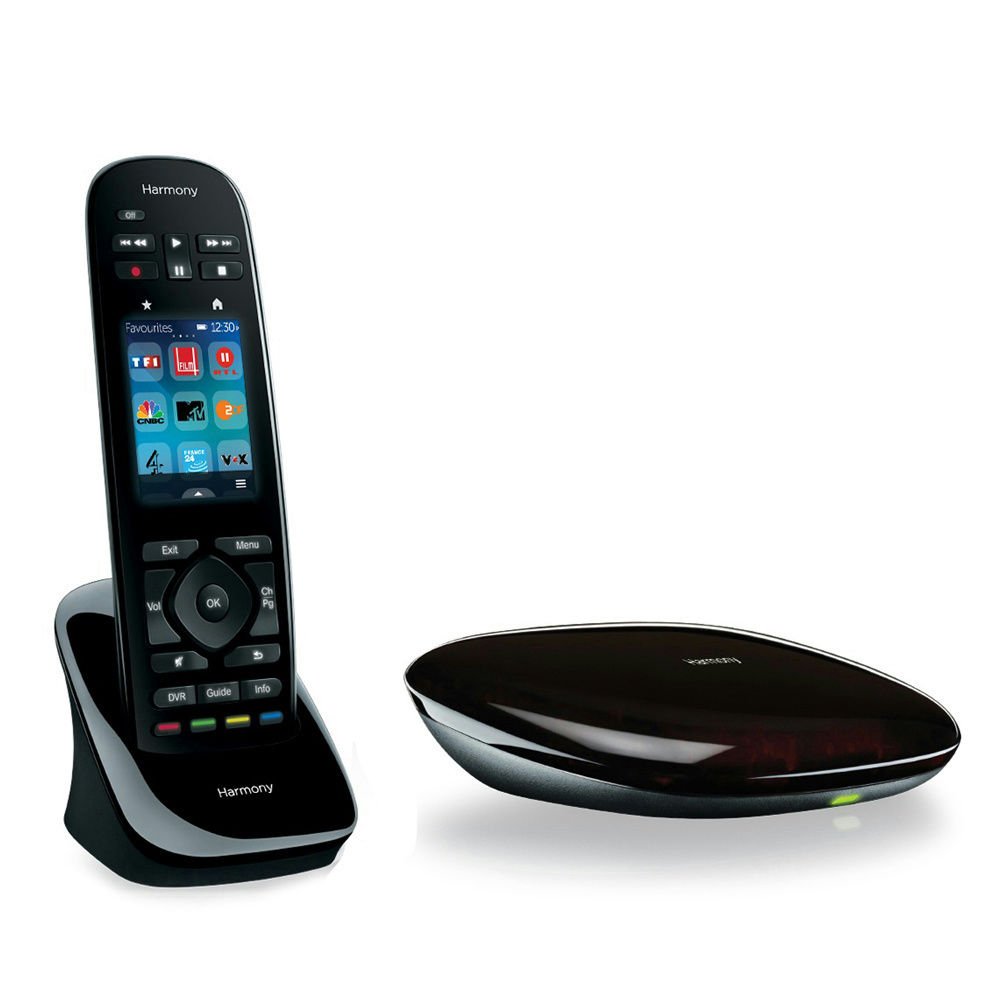
Logitech Harmony Ultimate Remote 915-000201 Touch Screen Closed Cabinet RF
10 available
Details
Shipping: US-Mainland: free (more destinations)
Sales Tax: check
Condition: Brand new
*The store has not been updated recently. You may want to contact the merchant to confirm the availability of the product.
Ships Within 1-3 Business Days RETAIL PACKAGING
The most powerful Harmony remote. It redefines ultimate control over your entertainment system—including game consoles and devices behind closed cabinet doors. One simple tap of the touch screen adjusts your entire home entertainment system so you can switch between movies, game consoles, favorite TV stations and music without fumbling with multiple remotes or button presses. Customize it the way you enjoy your entertainment. It has the power and intelligence to do what you demand.
Harmony Hub
Closed-cabinet and game console control
Included Harmony Hub turns RF signals from the remote into IR or Bluetooth commands your devices can understand
Control devices you can’t see—behind closed cabinet doors or walls
Control your PS3, Wii or Xbox360, including your Internet subscription services, like Netflix or Hulu
Ultimate Power Features
Ultimate power features
Dual button mapping: Buttons can be programmed for both short and long presses to perform two functions like FF and Skip—effectively doubling your command options.
One-touch activity sequences: Create a series of up to 10 steps with any activity, including start and leave actions
Haptic feedback: A gentle vibration lets you know when the remote receives a command from the touch screen, so there’s no need to look down.
Philips Hue lights
Control Philips Hue lights*
Integrate lighting control into your Harmony activities.
One touch to dim or turn off your lights.
Save color setting to specific activities, like Listen to Music, Play a Game or watch a movie.
*Phillips Hue lights sold separately. Online setup required.
Customizable color touch screen
Customizable color touch screen
One-touch1 interaction with a vibrant color touch screen
Swipe and tap to change channels, adjust volume, fast-forward, skip or rewind
Up to 50 easy-to-customize channel icons3
Organize and re-order buttons, activities, and favorite channel icons—right on the remote
Illuminated Buttons
Ultimate convenience features
Illuminated buttons—easy to press and to navigate your entertainment, even in the dark
Touch screen switches easily to a number pad
Auto-awake—screen lights up when you tilt your remote, for easy control in dark rooms.
Charging Station
Power within easy reach
Included charging station keeps your remote fully charged and always within arm’s reach
Never search for your remote or batteries again
Smartphone App
Harmony smartphone app
Turns your smartphone into a Harmony remote
Lets everyone in the house have their own customized layout
Controls 15 devices
Works with virtually any device
Control up to 15 devices with the power of just one Harmony remote
Compatible with over 225,000 devices from 5,000+ brands
Knows when your devices are not synced and automatically corrects modes (off/on, inputs, device state)
Works with devices you own today and add tomorrow—just connect your remote to Harmony’s regularly updated online device database.
Easy Setup
Easy guided online setup
Connect the remote to your computer, go to MyHarmony.com, and download the commands for your devices
No need to enter endless equipment codes into your remote
Live customer support is ready to help if you need
Works with:
Online Setup – Windows PC:
Windows XP, Vista, 7 or 8
USB port
Online Setup – Mac:
Mac OS X 10.5 or later
USB port
iOS for Harmony App:
Wi-Fi enabled iPad, iPhone, or iPod touch with iOS 5.0 or later
Harmony App (free download from Apple App Store4)
Android for Harmony App:
Wi-Fi enabled Android 2.3 or later
Harmony App (free download from Google Play4)
Internet access
Wi-Fi required to use Harmony App
Supports 802.11 b/g/n, WPA Personal, WPA2-AES and 64/128 bit WEP encryption)
4. Data charges from your provider may apply if you download on a 3G or 4G data connection.
What's in the box?
Remote control (with rechargeable battery)
Harmony Hub
2 IR mini blasters
Charging station
USB cable
2 AC adapters
Software is available for download from Logitech website
The most powerful Harmony remote. It redefines ultimate control over your entertainment system—including game consoles and devices behind closed cabinet doors. One simple tap of the touch screen adjusts your entire home entertainment system so you can switch between movies, game consoles, favorite TV stations and music without fumbling with multiple remotes or button presses. Customize it the way you enjoy your entertainment. It has the power and intelligence to do what you demand.
Harmony Hub
Closed-cabinet and game console control
Included Harmony Hub turns RF signals from the remote into IR or Bluetooth commands your devices can understand
Control devices you can’t see—behind closed cabinet doors or walls
Control your PS3, Wii or Xbox360, including your Internet subscription services, like Netflix or Hulu
Ultimate Power Features
Ultimate power features
Dual button mapping: Buttons can be programmed for both short and long presses to perform two functions like FF and Skip—effectively doubling your command options.
One-touch activity sequences: Create a series of up to 10 steps with any activity, including start and leave actions
Haptic feedback: A gentle vibration lets you know when the remote receives a command from the touch screen, so there’s no need to look down.
Philips Hue lights
Control Philips Hue lights*
Integrate lighting control into your Harmony activities.
One touch to dim or turn off your lights.
Save color setting to specific activities, like Listen to Music, Play a Game or watch a movie.
*Phillips Hue lights sold separately. Online setup required.
Customizable color touch screen
Customizable color touch screen
One-touch1 interaction with a vibrant color touch screen
Swipe and tap to change channels, adjust volume, fast-forward, skip or rewind
Up to 50 easy-to-customize channel icons3
Organize and re-order buttons, activities, and favorite channel icons—right on the remote
Illuminated Buttons
Ultimate convenience features
Illuminated buttons—easy to press and to navigate your entertainment, even in the dark
Touch screen switches easily to a number pad
Auto-awake—screen lights up when you tilt your remote, for easy control in dark rooms.
Charging Station
Power within easy reach
Included charging station keeps your remote fully charged and always within arm’s reach
Never search for your remote or batteries again
Smartphone App
Harmony smartphone app
Turns your smartphone into a Harmony remote
Lets everyone in the house have their own customized layout
Controls 15 devices
Works with virtually any device
Control up to 15 devices with the power of just one Harmony remote
Compatible with over 225,000 devices from 5,000+ brands
Knows when your devices are not synced and automatically corrects modes (off/on, inputs, device state)
Works with devices you own today and add tomorrow—just connect your remote to Harmony’s regularly updated online device database.
Easy Setup
Easy guided online setup
Connect the remote to your computer, go to MyHarmony.com, and download the commands for your devices
No need to enter endless equipment codes into your remote
Live customer support is ready to help if you need
Works with:
Online Setup – Windows PC:
Windows XP, Vista, 7 or 8
USB port
Online Setup – Mac:
Mac OS X 10.5 or later
USB port
iOS for Harmony App:
Wi-Fi enabled iPad, iPhone, or iPod touch with iOS 5.0 or later
Harmony App (free download from Apple App Store4)
Android for Harmony App:
Wi-Fi enabled Android 2.3 or later
Harmony App (free download from Google Play4)
Internet access
Wi-Fi required to use Harmony App
Supports 802.11 b/g/n, WPA Personal, WPA2-AES and 64/128 bit WEP encryption)
4. Data charges from your provider may apply if you download on a 3G or 4G data connection.
What's in the box?
Remote control (with rechargeable battery)
Harmony Hub
2 IR mini blasters
Charging station
USB cable
2 AC adapters
Software is available for download from Logitech website
You may also be interested in:
-
$4.99

-
$11.99

-
$16.50

-
$9.95

-
$12.99
-
$22.00

-
$9.99

-
$34.99
-
$14.99

-
$6.10