
$18.50
On Hold
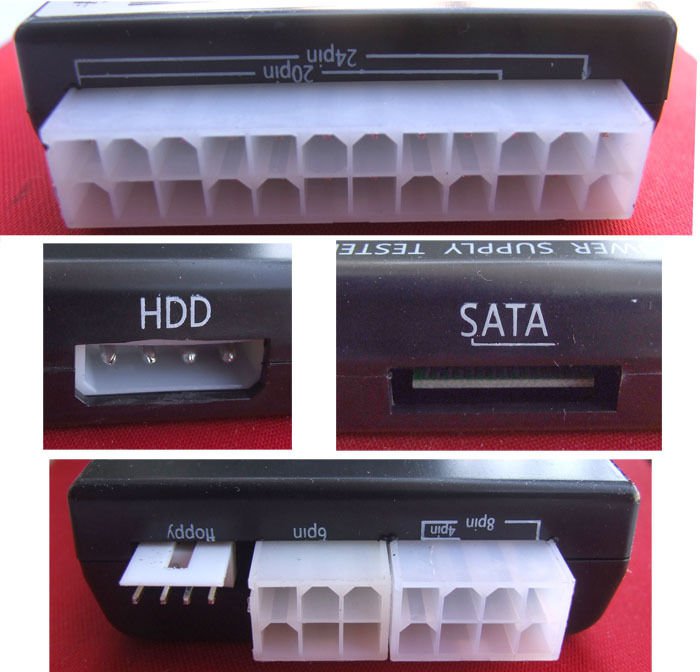
PC Desktop Computer 4 24 Pin Floppy PSU ATX SATA HDD port Power Supply Tester
More than 10 available
Details
Shipping: US-Mainland: free (more destinations)
Condition: Brand new
*The store has not been updated recently. You may want to contact the merchant to confirm the availability of the product.


Specification / Size:
Power Tester Instructions
1. To test power supply
2. The measured power 24P (20P) plug into a power tester corresponding 24P (20P) socket
3. Check the right side of seven lights (+3.3, -12V, PG, + 5VSB, + 12V, -5V, + 5V) is bright, full light as well
4. The measured power HDD plug into a power socket tester HDD, view the left two lamps (+ 12, + 5V) is bright, full light as well
5. Unplug the power cord from the HDD tester, then insert P4 (P6 / P8) plug into the corresponding P4 (P6 / P8) socket, view left a lamp (+ 12V) is bright, bright as well
6. Unplug from mains tester P4 (P6 / P8) plug, then insert the FLOPPY (floppy) plug into the corresponding socket FLOPPY see left two lights (+ 12V, + 5V) is bright, full light as well
7. FLOPPY pull the plug from the power tester, then insert the plug into the corresponding SATA SATA socket, view left three lights (+ 12V, + 3.3V, + 5V) is bright,
Quantity:
1PCS
Power Tester Instructions
1. To test power supply
2. The measured power 24P (20P) plug into a power tester corresponding 24P (20P) socket
3. Check the right side of seven lights (+3.3, -12V, PG, + 5VSB, + 12V, -5V, + 5V) is bright, full light as well
4. The measured power HDD plug into a power socket tester HDD, view the left two lamps (+ 12, + 5V) is bright, full light as well
5. Unplug the power cord from the HDD tester, then insert P4 (P6 / P8) plug into the corresponding P4 (P6 / P8) socket, view left a lamp (+ 12V) is bright, bright as well
6. Unplug from mains tester P4 (P6 / P8) plug, then insert the FLOPPY (floppy) plug into the corresponding socket FLOPPY see left two lights (+ 12V, + 5V) is bright, full light as well
7. FLOPPY pull the plug from the power tester, then insert the plug into the corresponding SATA SATA socket, view left three lights (+ 12V, + 3.3V, + 5V) is bright,
Quantity:
1PCS


 HK, NT
