
$125.50
On Hold
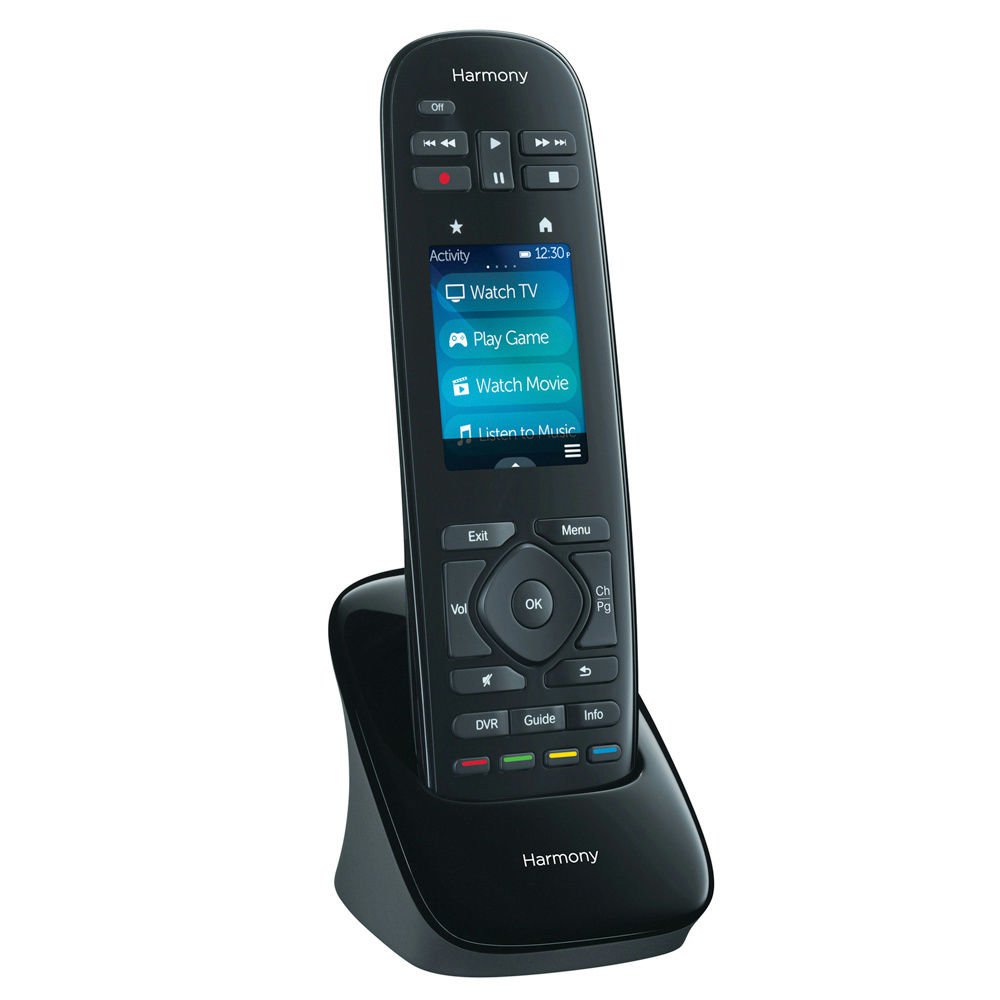
Logitech Harmony Touch Universal Remote 915-000198 with Color Touchscreen black
8 available, 2 sold
Details
Shipping: US-Mainland: free (more destinations)
Sales Tax: check
Condition: Brand new
*The store has not been updated recently. You may want to contact the merchant to confirm the availability of the product.


Ships Within 1-3 Business Days COMES IN BULK PACKAGE OVERSTOCK ITEM FROM RETAIL STORE
Overview
Logitech Harmony Touch
This is not a remote.
Harmony Touch is a one-touch wonder that’s redefining ultimate control over your home entertainment.
Now you can instantly access whatever you want to watch, hear or play with a tap of a touch screen.
To learn more about Harmony remotes,
Logitech Harmony Touch
Intuitive color touch screen
Fluid, one-touch1 interaction with a vibrant, color touch screen
Smoothly swipe and scroll to your favorite entertainment options—TV channels, movies, games, Organize and re-order icons, buttons, activities, settings and more the way you like them, right on the remote music—all with one touch
New onscreen programmable gestures so you can skip, pause and access other commands more quickly
Personalize your device
50 easy-to-customize channel icons—watch your favorite channels instantly with a simple tap2
Simply select your channel icons from a list on MyHarmony.com and save them to your remote
Create more unique favorite icons using your own, personalized images
Organize and re-order icons, buttons, activities, settings and more the way you like them, right on the remote
Simple, yet advanced
New on-screen swipe gestures, like volume up/down, skip and pause (all customizable) make it simpler to access immediate control
Includes advanced features, like sequences (or macros) to create the shortcuts you desire
Adjust time delays directly on the remote control to ensure all your devices have the time to change settings
One controls all
Your instant remote control consolidator—controls up to 15 devices you own today and add tomorrow
Works with virtually any device—compatible with over 225,000 devices from 5,000 brands
Future proof—online library makes it easy to update your remote with new devices and commands
1 After initial online setup.
2 Remote screen images are for illustrative purposes. Channel availability subject to your local service provider.
What you need
Windows-based PC
Windows 8, Windows 7, Windows Vista or Windows XP
Intel-based Mac computer
Mac OS X 10.5 or later
USB port
Internet access
Package Contents
Remote control (with built-in battery)
Charging station
USB cable
AC adapter
for user guide, click here
Overview
Logitech Harmony Touch
This is not a remote.
Harmony Touch is a one-touch wonder that’s redefining ultimate control over your home entertainment.
Now you can instantly access whatever you want to watch, hear or play with a tap of a touch screen.
To learn more about Harmony remotes,
Logitech Harmony Touch
Intuitive color touch screen
Fluid, one-touch1 interaction with a vibrant, color touch screen
Smoothly swipe and scroll to your favorite entertainment options—TV channels, movies, games, Organize and re-order icons, buttons, activities, settings and more the way you like them, right on the remote music—all with one touch
New onscreen programmable gestures so you can skip, pause and access other commands more quickly
Personalize your device
50 easy-to-customize channel icons—watch your favorite channels instantly with a simple tap2
Simply select your channel icons from a list on MyHarmony.com and save them to your remote
Create more unique favorite icons using your own, personalized images
Organize and re-order icons, buttons, activities, settings and more the way you like them, right on the remote
Simple, yet advanced
New on-screen swipe gestures, like volume up/down, skip and pause (all customizable) make it simpler to access immediate control
Includes advanced features, like sequences (or macros) to create the shortcuts you desire
Adjust time delays directly on the remote control to ensure all your devices have the time to change settings
One controls all
Your instant remote control consolidator—controls up to 15 devices you own today and add tomorrow
Works with virtually any device—compatible with over 225,000 devices from 5,000 brands
Future proof—online library makes it easy to update your remote with new devices and commands
1 After initial online setup.
2 Remote screen images are for illustrative purposes. Channel availability subject to your local service provider.
What you need
Windows-based PC
Windows 8, Windows 7, Windows Vista or Windows XP
Intel-based Mac computer
Mac OS X 10.5 or later
USB port
Internet access
Package Contents
Remote control (with built-in battery)
Charging station
USB cable
AC adapter
for user guide, click here
You may also be interested in:
-
$9.95
-
$45.00

-
$44.99
-
$16.99
-
$16.99
-
$7.99
-
$10.95

-
$11.99
-
$44.95
-
$29.00


