
$34.99
Add to Cart
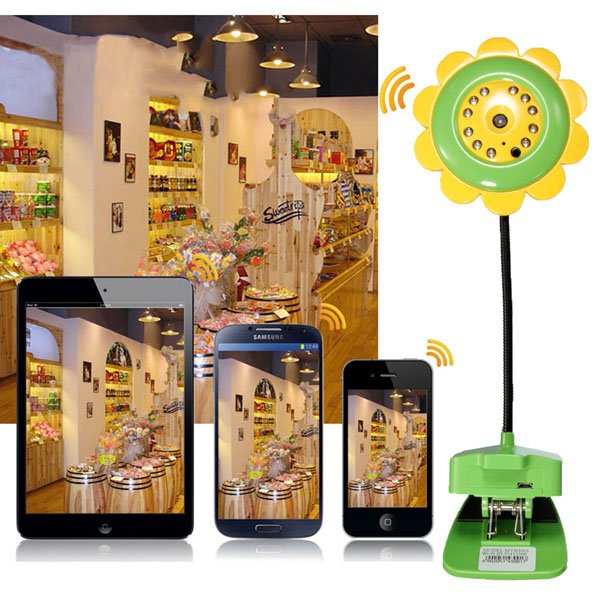
Sunflower Wireless WiFi IP Camera Video Monitor Night Vision for Smartphone
More than 10 available
Details
Shipping: US-Mainland: free (more destinations)
Condition: Brand new
*The store has not been updated recently. You may want to contact the merchant to confirm the availability of the product.


Description:
Sunflower Wireless WiFi IP Camera Video Monitor Night Vision for Smartphone
Features:
Wireless connect mobile phone directly, support P2P, No need router.
11 IR LEDs, more than 6 meters distance, controlled by photoresistance.
Built-in mic, to capture voice and remote listen.
Point to Point, no need domain name, WIFI network, one click setting, plug and play.
Built-in card slot, support memory card, 32G max.
Support Android phones, iPhone, iPad.
Specification:
Rated voltage: 5V
Power: 3W
Camera: 0.3 mega pixels
Range: Night 6 meters; Day 20 meters
Recording file: About 80M/hours(Auto record)
About 200M/hours(Alarm record)
Frames rate: Max 16fps
Wireless transmission protocol: 802.11b/g
Working Temperature: -10-50℃
Working modes:
AP mode: The device is used as WIFI hotspot(The device will transmit a WIFI signal, such as "MV", and you
can search it on the "WLAN" of smart phone)
Station mode: The device interconnects with router so as to connect with Internet.
Usage instructions:
1. Scan QR code on the user manual to install APP"V380" for smart phones
2. Add and watch
The way to connect camera with Internet:
The first way: Quick WIFI Config(This function is not supported by iPhone)
1)By clicking "Quick WIFI Config", the smart phone can search the devices automatically
2)Choose the LAN you want to connect and enter the password, then click "save"
3)The device will appear in the main interface, click it to watch the image
The second way: Sound Wave Config(please pay attention to the voice prompt)(suitable for iPhone and Adroid phone)
1)Click "+" button at the top-right of the main interface and choose "Sound Wave Config".
Enter password for the LAN you want to connect then click "next"
The third way: Hot Config(note that voice prompt)(suitable for iPhone and Adroid phones)
1)Open the phone WIFI, to connect the IPC hot MV* The beggining of the hot spots. The connection
is successful then open the phone to the client
2)Click on the search equipment
3)Click on the picture on the right of the device configuration into the network setting, select the router, you
use the WIFI password input. Click save, please pay attention to the voice prompt. Configuration is
successful, you can use the pubilc for a visit
Package includes:
1 x Wifi Camera
1 x USB Cable
1 x Power Adapter
1 x User Manual
SKU1026611FD
Sunflower Wireless WiFi IP Camera Video Monitor Night Vision for Smartphone
Features:
Wireless connect mobile phone directly, support P2P, No need router.
11 IR LEDs, more than 6 meters distance, controlled by photoresistance.
Built-in mic, to capture voice and remote listen.
Point to Point, no need domain name, WIFI network, one click setting, plug and play.
Built-in card slot, support memory card, 32G max.
Support Android phones, iPhone, iPad.
Specification:
Rated voltage: 5V
Power: 3W
Camera: 0.3 mega pixels
Range: Night 6 meters; Day 20 meters
Recording file: About 80M/hours(Auto record)
About 200M/hours(Alarm record)
Frames rate: Max 16fps
Wireless transmission protocol: 802.11b/g
Working Temperature: -10-50℃
Working modes:
AP mode: The device is used as WIFI hotspot(The device will transmit a WIFI signal, such as "MV", and you
can search it on the "WLAN" of smart phone)
Station mode: The device interconnects with router so as to connect with Internet.
Usage instructions:
1. Scan QR code on the user manual to install APP"V380" for smart phones
2. Add and watch
The way to connect camera with Internet:
The first way: Quick WIFI Config(This function is not supported by iPhone)
1)By clicking "Quick WIFI Config", the smart phone can search the devices automatically
2)Choose the LAN you want to connect and enter the password, then click "save"
3)The device will appear in the main interface, click it to watch the image
The second way: Sound Wave Config(please pay attention to the voice prompt)(suitable for iPhone and Adroid phone)
1)Click "+" button at the top-right of the main interface and choose "Sound Wave Config".
Enter password for the LAN you want to connect then click "next"
The third way: Hot Config(note that voice prompt)(suitable for iPhone and Adroid phones)
1)Open the phone WIFI, to connect the IPC hot MV* The beggining of the hot spots. The connection
is successful then open the phone to the client
2)Click on the search equipment
3)Click on the picture on the right of the device configuration into the network setting, select the router, you
use the WIFI password input. Click save, please pay attention to the voice prompt. Configuration is
successful, you can use the pubilc for a visit
Package includes:
1 x Wifi Camera
1 x USB Cable
1 x Power Adapter
1 x User Manual
SKU1026611FD
Other Products from smartonlinebiz (View All)
-
$11.90

-
$11.50
-
$20.90
-
$23.40

-
$25.40

-
$19.99

-
$22.60
-
$15.80
-
$13.69
-
$11.40



 MY, Johor
