
$19.95
Add to Cart
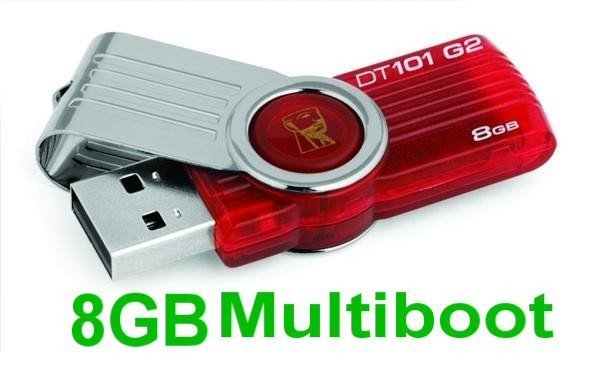
8GB Multiboot USB Flash Drive, 10 bootable Systems, repair Windows, enjoy Linux
More than 10 available, 22 sold
Details
Shipping: US-Mainland: free (more destinations)
Condition: Brand new
*The store has not been updated recently. You may want to contact the merchant to confirm the availability of the product.
NEW
8GB USB Multiboot Flash Drive, Wifi, Windows Repair, more
Linux Multiboot USB Flash Drive
Just boot from this 8GB USB drive and select the operating system from a list. This is an excellent way for testing different linux distributions without affect your hard drive. You can later decide if you want to install one of them or just continue using the live systems from the USB. The choice is all yours.
A vast source of information and testing for computer enthusiats
Repair Windows and Linux machines
Recover Windows passwords.
Partition tools, boot repair in single or multiple operating systems scenarios (Windows and/or Linux)
Great compatibility with practically any PC (all included systems are 32bit and works in 32bit and 64bit computers)
This multiboot USB includes the following Linux Distributions in alphabetical order:
Fedora 19
This is the latest version of the Fedora Linux operating system's Desktop Edition. It's everything you need to try out Fedora — you don't have to erase anything on your current system to try it out, and it won't put your files at risk. Take Fedora for a test drive, and if you like it, you can install Fedora directly to your hard drive straight from the Live Media desktop if you like.
Knoppix 7.04
Knoppix is a bootable CD with a collection of GNU/Linux software, automatic hardware detection, and support for many graphics cards, sound cards, SCSI and USB devices and other peripherals. Knoppix can be used as a Linux demo, educational CD, rescue system, or adapted and used as a platform for commercial software product demos. It is not necessary to install anything on a hard disk. Due to on-the-fly decompression, the CD can have up to 2 GB of executable software installed on it.
Linux Mint Cinnamon 15
Linux Mint is a Linux distribution for desktop computers, based on Ubuntu or Debian. Linux Mint is aimed at being a "modern, elegant and comfortable operating system which is both powerful and easy to use." Mint provides full out-of-the-box multimedia support by including some proprietary software such as Java and Adobe Flash. Mint's motto is "from freedom came elegance".
New versions of Linux Mint are released every six months. The first release, named "Ada", was released in 2006. Its latest and 15th release is "Olivia".
Ophcrack
Ophcrack is a free Windows password cracker based on rainbow tables. It is a very efficient implementation of rainbow tables done by the inventors of the method. It comes with a Graphical User Interface and runs on multiple platforms.
Features:
» Runs on Windows, Linux/Unix, Mac OS X, ...
» Cracks LM and NTLM hashes.
» Free tables available for Windows XP and Vista/7.
» Brute-force module for simple passwords.
» Audit mode and CSV export.
» Real-time graphs to analyze the passwords.
» LiveCD available to simplify the cracking.
» Dumps and loads hashes from encrypted SAM recovered from a Windows partition.
» Free and open source software (GPL).
Puppy Slacko 5.5
Puppy Linux is yet another Linux distribution. What's different here is that Puppy is extraordinarily small, yet quite full-featured. Puppy boots into a ramdisk and, unlike live CD distributions that have to keep pulling stuff off the CD, it loads into RAM. This means that all applications start in the blink of an eye and respond to user input instantly. Puppy Linux has the ability to boot off a flash card or any USB memory device, CDROM, Zip disk or LS/120/240 Superdisk, floppy disks, internal hard drive. It can even use a multisession formatted CD-RW/DVD-RW to save everything back to the CD/DVD with no hard drive required at all.
Redo Backup
Redo Backup and Recovery is an Ubuntu-based live CD featuring backup, restore, and disaster recovery software. It centres around an easy-to-use graphical program for running bare-metal backup and recovery on hard disk partitions, as well as on external hard drives and network shares. The CD also includes several popular data recovery programs and a web browser.
Slax 7.0.8
Slax is a modern, portable, small and fast Linux operating system with a modular approach and outstanding design. Despite its small size, Slax provides a wide collection of pre-installed software for daily use, including a well organized graphical user interface and useful recovery tools for system administrators.
The modular approach gives you the ability to include any other software in Slax easily. If you're missing your favourite text editor, networking tool or game, simply download a module with the software and copy it to Slax, no need to install, no need to configure.
Trinity Rescue Kit
Trinity Rescue Kit or TRK is a free live Linux distribution that aims specifically at recovery and repair operations on Windows machines, but is equally usable for Linux recovery issues. Since version 3.4 it has an easy to use scrollable text menu that allows anyone who masters a keyboard and some English to perform maintenance and repair on a computer, ranging from password resetting over disk cleanup to virus scanning
It is possible to boot TRK in three different ways:
-as a bootable CD which you can burn yourself from a downloadable isofile or a self burning Windows executable
-from a USB stick/disk (optionally also a fixed disk), installable from Windows or from the bootable TRK cd (which is easier and safer)
-from network over PXE: you start 1 TRK from CD or USB and you run all other computers from that one over the network without modifying anything to you local network.
Ever since version 3.4, TRK has received an easy to use textmenu but has equally kept the commandline.
Ubuntu 13.04
Ubuntu is an operating system with Linux kernel based on Debian and distributed as free and open source software. Ubuntu uses the Unity Desktop as its default desktop environment. It is named after the Southern African philosophy of ubuntu, which can be translated as "humanity towards others" or "the belief in a universal bond of sharing that connects all humanity".
As of 2012, according to online surveys, Ubuntu is the most popular Linux distribution on desktop/laptop personal computers, and most Ubuntu coverage focuses on its use in that market. However, it is also popular on servers and for cloud computing.
Ubuntu comes installed with a wide range of software that includes LibreOffice, Firefox, Thunderbird, Empathy, Transmission, and several lightweight games (such as Sudoku and chess). Additional software that is not installed by default (including software that used to be in the default installation such as Evolution, GIMP, Pidgin, and Synaptic) can be downloaded and installed using the Ubuntu Software Center or other apt-based package management tools. Programs in the Software Center are mostly free, but there are also priced products, including applications and magazines.
xPUD
xPUD is an Ubuntu-based Linux distribution and live CD/USB image consisting mainly of a web browser and a media player, with a simple user interface on top. The goal of the developers is to create an operating system which is extremely lightweight and fast-booting, includes applications for daily use, and has an intuitive, easy-to-use desktop interface.
Zorin OS 7
Zorin OS is an Ubuntu-based Linux distribution designed especially for newcomers to Linux. It has a Windows-like graphical user interface and many programs similar to those found in Windows. Zorin OS also comes with an application that lets users run many Windows programs. The distribution's ultimate goal is to provide a Linux alternative to Windows and let Windows users enjoy all the features of Linux without complications.
What is a Bootable USB Flash Drive?
A live USB is a USB flash drive or a USB external hard disk drive containing a full operating system that can be booted. Live USBs are closely related to live CDs, but sometimes have the ability to persistently save settings and permanently install software packages back onto the USB device.
How To Use It
Insert the bootable USB flash drive in your target computer and restart it. Most newer computers can boot from a USB flash drive. If your computer does not automatically do so, you might need to edit the BIOS settings.
Restart your computer, and watch for a message telling you which key to press to enter the BIOS setup. It will usually be one of F1, F2, DEL, ESC or F10. Press this key while your computer is booting to edit your BIOS settings. (On HP Mini Netbooks, they correct key is usually F9.)
Instead of editing BIOS settings, you can chose a boot device from the boot menu. Press the function key to enter the boot menu when your computer is booting. Typically, the boot screen displays which key you need to press. It maybe one of F12, F10. Note: with some motherboards you have to select 'hard disk/USB-HDD0' to choose the USB flash disk.
Interested in other operating systems in bootable flash drives? Check out my other items!
Fast and Free USPS shipping
All the contents of this USB Flash Drive are under de GNU-General Public License
8GB USB Multiboot Flash Drive, Wifi, Windows Repair, more
Linux Multiboot USB Flash Drive
Just boot from this 8GB USB drive and select the operating system from a list. This is an excellent way for testing different linux distributions without affect your hard drive. You can later decide if you want to install one of them or just continue using the live systems from the USB. The choice is all yours.
A vast source of information and testing for computer enthusiats
Repair Windows and Linux machines
Recover Windows passwords.
Partition tools, boot repair in single or multiple operating systems scenarios (Windows and/or Linux)
Great compatibility with practically any PC (all included systems are 32bit and works in 32bit and 64bit computers)
This multiboot USB includes the following Linux Distributions in alphabetical order:
Fedora 19
This is the latest version of the Fedora Linux operating system's Desktop Edition. It's everything you need to try out Fedora — you don't have to erase anything on your current system to try it out, and it won't put your files at risk. Take Fedora for a test drive, and if you like it, you can install Fedora directly to your hard drive straight from the Live Media desktop if you like.
Knoppix 7.04
Knoppix is a bootable CD with a collection of GNU/Linux software, automatic hardware detection, and support for many graphics cards, sound cards, SCSI and USB devices and other peripherals. Knoppix can be used as a Linux demo, educational CD, rescue system, or adapted and used as a platform for commercial software product demos. It is not necessary to install anything on a hard disk. Due to on-the-fly decompression, the CD can have up to 2 GB of executable software installed on it.
Linux Mint Cinnamon 15
Linux Mint is a Linux distribution for desktop computers, based on Ubuntu or Debian. Linux Mint is aimed at being a "modern, elegant and comfortable operating system which is both powerful and easy to use." Mint provides full out-of-the-box multimedia support by including some proprietary software such as Java and Adobe Flash. Mint's motto is "from freedom came elegance".
New versions of Linux Mint are released every six months. The first release, named "Ada", was released in 2006. Its latest and 15th release is "Olivia".
Ophcrack
Ophcrack is a free Windows password cracker based on rainbow tables. It is a very efficient implementation of rainbow tables done by the inventors of the method. It comes with a Graphical User Interface and runs on multiple platforms.
Features:
» Runs on Windows, Linux/Unix, Mac OS X, ...
» Cracks LM and NTLM hashes.
» Free tables available for Windows XP and Vista/7.
» Brute-force module for simple passwords.
» Audit mode and CSV export.
» Real-time graphs to analyze the passwords.
» LiveCD available to simplify the cracking.
» Dumps and loads hashes from encrypted SAM recovered from a Windows partition.
» Free and open source software (GPL).
Puppy Slacko 5.5
Puppy Linux is yet another Linux distribution. What's different here is that Puppy is extraordinarily small, yet quite full-featured. Puppy boots into a ramdisk and, unlike live CD distributions that have to keep pulling stuff off the CD, it loads into RAM. This means that all applications start in the blink of an eye and respond to user input instantly. Puppy Linux has the ability to boot off a flash card or any USB memory device, CDROM, Zip disk or LS/120/240 Superdisk, floppy disks, internal hard drive. It can even use a multisession formatted CD-RW/DVD-RW to save everything back to the CD/DVD with no hard drive required at all.
Redo Backup
Redo Backup and Recovery is an Ubuntu-based live CD featuring backup, restore, and disaster recovery software. It centres around an easy-to-use graphical program for running bare-metal backup and recovery on hard disk partitions, as well as on external hard drives and network shares. The CD also includes several popular data recovery programs and a web browser.
Slax 7.0.8
Slax is a modern, portable, small and fast Linux operating system with a modular approach and outstanding design. Despite its small size, Slax provides a wide collection of pre-installed software for daily use, including a well organized graphical user interface and useful recovery tools for system administrators.
The modular approach gives you the ability to include any other software in Slax easily. If you're missing your favourite text editor, networking tool or game, simply download a module with the software and copy it to Slax, no need to install, no need to configure.
Trinity Rescue Kit
Trinity Rescue Kit or TRK is a free live Linux distribution that aims specifically at recovery and repair operations on Windows machines, but is equally usable for Linux recovery issues. Since version 3.4 it has an easy to use scrollable text menu that allows anyone who masters a keyboard and some English to perform maintenance and repair on a computer, ranging from password resetting over disk cleanup to virus scanning
It is possible to boot TRK in three different ways:
-as a bootable CD which you can burn yourself from a downloadable isofile or a self burning Windows executable
-from a USB stick/disk (optionally also a fixed disk), installable from Windows or from the bootable TRK cd (which is easier and safer)
-from network over PXE: you start 1 TRK from CD or USB and you run all other computers from that one over the network without modifying anything to you local network.
Ever since version 3.4, TRK has received an easy to use textmenu but has equally kept the commandline.
Ubuntu 13.04
Ubuntu is an operating system with Linux kernel based on Debian and distributed as free and open source software. Ubuntu uses the Unity Desktop as its default desktop environment. It is named after the Southern African philosophy of ubuntu, which can be translated as "humanity towards others" or "the belief in a universal bond of sharing that connects all humanity".
As of 2012, according to online surveys, Ubuntu is the most popular Linux distribution on desktop/laptop personal computers, and most Ubuntu coverage focuses on its use in that market. However, it is also popular on servers and for cloud computing.
Ubuntu comes installed with a wide range of software that includes LibreOffice, Firefox, Thunderbird, Empathy, Transmission, and several lightweight games (such as Sudoku and chess). Additional software that is not installed by default (including software that used to be in the default installation such as Evolution, GIMP, Pidgin, and Synaptic) can be downloaded and installed using the Ubuntu Software Center or other apt-based package management tools. Programs in the Software Center are mostly free, but there are also priced products, including applications and magazines.
xPUD
xPUD is an Ubuntu-based Linux distribution and live CD/USB image consisting mainly of a web browser and a media player, with a simple user interface on top. The goal of the developers is to create an operating system which is extremely lightweight and fast-booting, includes applications for daily use, and has an intuitive, easy-to-use desktop interface.
Zorin OS 7
Zorin OS is an Ubuntu-based Linux distribution designed especially for newcomers to Linux. It has a Windows-like graphical user interface and many programs similar to those found in Windows. Zorin OS also comes with an application that lets users run many Windows programs. The distribution's ultimate goal is to provide a Linux alternative to Windows and let Windows users enjoy all the features of Linux without complications.
What is a Bootable USB Flash Drive?
A live USB is a USB flash drive or a USB external hard disk drive containing a full operating system that can be booted. Live USBs are closely related to live CDs, but sometimes have the ability to persistently save settings and permanently install software packages back onto the USB device.
How To Use It
Insert the bootable USB flash drive in your target computer and restart it. Most newer computers can boot from a USB flash drive. If your computer does not automatically do so, you might need to edit the BIOS settings.
Restart your computer, and watch for a message telling you which key to press to enter the BIOS setup. It will usually be one of F1, F2, DEL, ESC or F10. Press this key while your computer is booting to edit your BIOS settings. (On HP Mini Netbooks, they correct key is usually F9.)
Instead of editing BIOS settings, you can chose a boot device from the boot menu. Press the function key to enter the boot menu when your computer is booting. Typically, the boot screen displays which key you need to press. It maybe one of F12, F10. Note: with some motherboards you have to select 'hard disk/USB-HDD0' to choose the USB flash disk.
Interested in other operating systems in bootable flash drives? Check out my other items!
Fast and Free USPS shipping
All the contents of this USB Flash Drive are under de GNU-General Public License

