
$65.00
Add to Cart
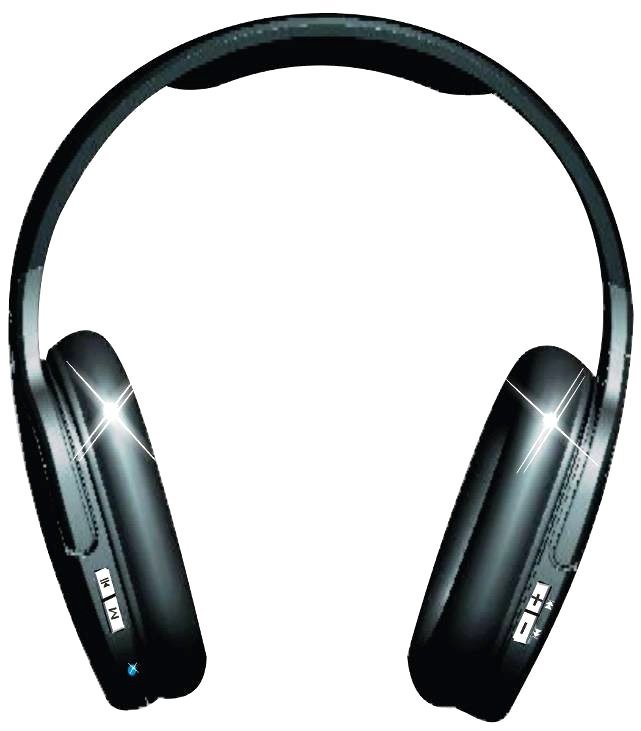
TF Card-Inserted Digital Wireless Headset,FM radio,Wireless Headphone, Earphone


Product Description
I. Product Introduction
Thanks to buy and use our company's Card-Inserted Digital Wireless Headset. This headset supports playing music on TF Card, as well as various audio formats such as MP3 and WMA; FM radio is available; with built-in microphone; this headset has two-way audio input and output function, can be served as cable headset as well as for use of audio output. Please refer to the enclosed manual for specific operations.
II.Keys Operation and Functions
1. Keys Operation
1, ON/OFF :Switch to ON to turn on the headset. In the context of ON, switch it to OFF to turn off.
2, PAUSE: When playing documents in TF Card: press this key to pause; under Radio Mode: press this key to switch to mute state.
Under Wireless Mode, press this key to enter mute function (applicable to type TM-905)
3,MODE:mode conversion function Type 911: turn on the power, then enters default of playing music on TF card; press M for a short time, then enters FM Mode; press M again, then enters playing music on TF Card; and so on and so on ……
Updated version of Type 905: turn on the power, then enters default of playing music on TF Card; press M for a short time for the first time; press it for the second time, then the headset enters FM Mode; press it again, then the headset enters Wireless Mode; and so on and so on ……
4,+ : In mode of playing music on TF card: press it for a short time, enters the last song; press it for a long time, the volume increases
In mode of FM radio: press it for a short time, enters front channel searching; press it for a long time, the volume increases
5, - : In mode of playing music on TF card: press this key for a short time, enters the next song; press it for a long time, the volume lowers
In mode of FM mode: press it for a short time, enters back channel searching; press it for a long time, the volume lowers
2. Download
1. In boot-up state, use the enclosed data cable to connect the headset with the computer, then the headset automatically stops playing and enters Storage Model, unfold My Computer, click Removable Disk, and download the documents directly (note: format TF before first use)
3. How to charge
Directly connect USB data cable to the USB interface on the computer, then the headset will charge automatically. In the state of charging, the red indicator is on; when the red indicator turns to green, it means the battery charging is full. Or use external source to charge: power output must be applicable to standard USB voltage and interface.
4. How to play wirelessly (applicable to Type TM-905, TM-911 doesn't has this function)
a. Insert the enclosed transmitter to the USB interface on the computer. After the computer has discovered this hardware and got connected, click the player to play.
b. Press the key M on the headset, then enters Wireless Mode.
c. If no sound can be heard on the headset, may be the transmitter hasn't been well connected with the computer, so pull it out and insert it again; if the transmitter has been well connected with the computer, please dblclick the name of song or reboot the player.
III. Technical Parameters
IV Precautions:
1) Fully charge it before first use
2) This headset is not waterproof, keep it away from water and moisture so that the components can be used normally
3) Connect it to the USB interface on the computer to charge when using, don't change or connect it to external power source
I. Product Introduction
Thanks to buy and use our company's Card-Inserted Digital Wireless Headset. This headset supports playing music on TF Card, as well as various audio formats such as MP3 and WMA; FM radio is available; with built-in microphone; this headset has two-way audio input and output function, can be served as cable headset as well as for use of audio output. Please refer to the enclosed manual for specific operations.
II.Keys Operation and Functions
1. Keys Operation
1, ON/OFF :Switch to ON to turn on the headset. In the context of ON, switch it to OFF to turn off.
2, PAUSE: When playing documents in TF Card: press this key to pause; under Radio Mode: press this key to switch to mute state.
Under Wireless Mode, press this key to enter mute function (applicable to type TM-905)
3,MODE:mode conversion function Type 911: turn on the power, then enters default of playing music on TF card; press M for a short time, then enters FM Mode; press M again, then enters playing music on TF Card; and so on and so on ……
Updated version of Type 905: turn on the power, then enters default of playing music on TF Card; press M for a short time for the first time; press it for the second time, then the headset enters FM Mode; press it again, then the headset enters Wireless Mode; and so on and so on ……
4,+ : In mode of playing music on TF card: press it for a short time, enters the last song; press it for a long time, the volume increases
In mode of FM radio: press it for a short time, enters front channel searching; press it for a long time, the volume increases
5, - : In mode of playing music on TF card: press this key for a short time, enters the next song; press it for a long time, the volume lowers
In mode of FM mode: press it for a short time, enters back channel searching; press it for a long time, the volume lowers
2. Download
1. In boot-up state, use the enclosed data cable to connect the headset with the computer, then the headset automatically stops playing and enters Storage Model, unfold My Computer, click Removable Disk, and download the documents directly (note: format TF before first use)
3. How to charge
Directly connect USB data cable to the USB interface on the computer, then the headset will charge automatically. In the state of charging, the red indicator is on; when the red indicator turns to green, it means the battery charging is full. Or use external source to charge: power output must be applicable to standard USB voltage and interface.
4. How to play wirelessly (applicable to Type TM-905, TM-911 doesn't has this function)
a. Insert the enclosed transmitter to the USB interface on the computer. After the computer has discovered this hardware and got connected, click the player to play.
b. Press the key M on the headset, then enters Wireless Mode.
c. If no sound can be heard on the headset, may be the transmitter hasn't been well connected with the computer, so pull it out and insert it again; if the transmitter has been well connected with the computer, please dblclick the name of song or reboot the player.
III. Technical Parameters
IV Precautions:
1) Fully charge it before first use
2) This headset is not waterproof, keep it away from water and moisture so that the components can be used normally
3) Connect it to the USB interface on the computer to charge when using, don't change or connect it to external power source


