
$10.00
On Hold
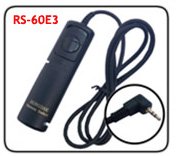
Samsung RS-60E3 Remote Shutter Release for Samsung GX-20 GX-10
More than 10 available
Details
Shipping: US-Mainland: $7.00 (more destinations)
Condition: Brand new
*The store has not been updated recently. You may want to contact the merchant to confirm the availability of the product.
Samsung RS-60E3 Compatible Remote Shutter Release
It is handy for reducing camera vibration on super telephoto shots, macro-photography, and bulb exposures.
Ideal for tripod shooting, the Remote Shutter Release allows you to release the shutter when you want to avoid camera vibration or
to shoot from a distance.
Features:
Two-stage release button - halfway pressing for auto focus and complete pressing for shutter release.
Length: 3 feet
Type: Remote Shutter Release Cables / Cords
Compatible With:
Canon 1000D/450D/400D/350D/300D,PENTAX K20D/K200D/K10D/K100D and Samsung GX-20/GX-10
Before Proceeding, insert the plug into the camera's remote control socket with the mark on socket(if available) and turn the camera on.
1. The release button can be pressed halfway or all the way. Presseing it halfway activates the autofocus and sets the shutter speed and aperturesettings.
2. Pressing it completely takes the picture.
3. For long exposures or coninuous shooting, press the Release button completely and slide it in the direction of the arrow. This locks the button in the depressed button, slide the button back to its originalposition.
It is handy for reducing camera vibration on super telephoto shots, macro-photography, and bulb exposures.
Ideal for tripod shooting, the Remote Shutter Release allows you to release the shutter when you want to avoid camera vibration or
to shoot from a distance.
Features:
Two-stage release button - halfway pressing for auto focus and complete pressing for shutter release.
Length: 3 feet
Type: Remote Shutter Release Cables / Cords
Compatible With:
Canon 1000D/450D/400D/350D/300D,PENTAX K20D/K200D/K10D/K100D and Samsung GX-20/GX-10
Before Proceeding, insert the plug into the camera's remote control socket with the mark on socket(if available) and turn the camera on.
1. The release button can be pressed halfway or all the way. Presseing it halfway activates the autofocus and sets the shutter speed and aperturesettings.
2. Pressing it completely takes the picture.
3. For long exposures or coninuous shooting, press the Release button completely and slide it in the direction of the arrow. This locks the button in the depressed button, slide the button back to its originalposition.


 CN, Guangdong
